- 00000018WIA30A3A870GYZ
- id_400217701.4
- Aug 13, 2022 3:22:29 PM
Low SAR mode
About this task
Modern MR scanners deliver high-performance gradients and RF systems. Strong time-varying electromagnetic fields (EMF) from an MR scanner can potentially invoke physiological responses including, but not limited to, peripheral nerve stimulation and tissue heating. In most countries the MR safety standard IEC 60601-2-33 provides safety limits for MR exams. The International Electrotechnical Commission (IEC) developed a widely-used MR safety standard via OPERATING MODE concept as described previously in the Operator Manual.
There is a critical need for safely performing MR exams on subjects with an MR Conditional Implant. MR Conditional Implant Imaging often requires a more flexible RF system control limit of physical parameters such as B1+ PEAK, B1+ RMS, Whole Body Specific Absorption Rate (WB-SAR), and Head Specific Absorption Rate (Head-SAR) to minimize potential tissue heating.
Low SAR mode is a mode designed to address such a need. Low SAR mode provides a means to limit the RF field based on values entered by the user.
| Warning | |
|---|---|
Low SAR mode does the following:
- Provides a scan mode for physicians to use for special situations where the risk may be higher (for example, sedated or unconscious patients where they are unable to report discomfort due to warming).
- Provides a flexible RF system control limit for scanning implants.
Low SAR mode allows you to set the Head SAR limit between 0.5 – 3.2 W/kg and the WB-SAR limit between 0.5 – 2.0 W/kg. In Low SAR mode, all PSDs operate with SAR as low as 0.5W/kg except the following, if applicable to your scanner:
- SSFSE: the WB-SAR and Head-SAR must be greater than or equal to 1.5 W/kg.
- Time Course FGRE is not supported for Low SAR mode.
Figure 1. Time Course FGRE message: FGRE Time Course is incompatible with Low SAR Mode 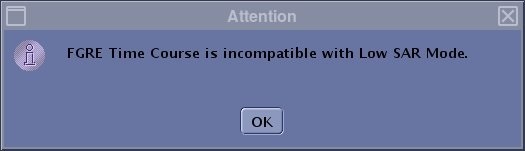
- Silenz MRA and 3D ASL are not supported when any of the following conditions are present: WB-SAR or HEAD-SAR is less than 1.5 W/kg, the B1+Peak is less than 20µT, the B1+RMS less than 2.0µT, and patient weight is greater than 150 kg.
The Low SAR option cannot be changed once an exam begins. The other SAR modes retain normal behavior in that they can be moved up; for example, you can move from Normal mode to First level mode within an exam.
GE recommends using Low SAR mode for scanning patients with MR Conditional implants. For all patients with MR Conditional implants, limit the length of scan protocols based on the manufacturers labeling. In general, you can reduce SAR by modifying PSD parameters such as:
- selecting the SAR Optimization User CV from the Advanced tab, if it is available
- decreasing the number of slices
- increasing the repetition time (TR)
- decreasing Echo Train Length (ETL) in Fast Spin Echo (FSE)
- replacement of Spin Echo (SE) or FSE PSDs with Gradient Echo (GRE) PSDs
- decreasing the flip angle in GRE
- decreasing the flip angle or refocus flip angle in SE or FSE (if available)
- replacement of FIESTA/COSMIC PSDs with GRE based PSDs
- selecting a parallel Imaging Option. For details, see Acquire a scan with ASSET or ARC considerations
- if the Spatial SAT Type is available from the Advanced tab, replace Strong (option 2) with Medium (option 1) or Light (option 0)
The Low SAR mode sets the same limits to both the long-term (6 minutes) and short-term (10 seconds) SAR, which means that a UPM trip is more likely in comparison to Normal mode.
In Low SAR mode, power monitor trips become more likely if the temperature in the scan room exceeds 24 degrees Celsius (75.2 degrees Fahrenheit), due to changes in the power monitor limitation as the temperature increases. If the power monitor trips and the six minute average is equal to User specified SAR limit or less, adjust the scan room temperature to be 24 degrees Celsius or less (for patient comfort the temperature should be 18 +/- 3 Celsius degrees).
Current IEC 60601-2-33 standard allows a short term SAR limit to be as high as 2 times as a long term 6 minutes average. There is some concern that RF-induced heating in the vicinity of implants can be very rapid. For simplicity, Low SAR mode strictly obeys the SAR limit, i.e. same limit for short and long term exposure.
The Auto TI scan parameter on the Details tab is available for T1FLAIR and T1FLAIR PROPELLER as long as Head-SAR and WB-SAR are larger or equal to 1.5W/kg, and B1+RMS are larger or equal to 1.5µT.
Use these steps when scanning patients with MR Conditional implants.
Step-by-step instructions
- Start an exam and once all demographic and protocol selections are complete, from the Worklist Manager work area, click Start Exam.
Figure 2. Start Exam button 
- From the Exam dB/dt and SAR Limits screen, click the Low SAR option button.
Figure 3. Exam dB/dt and SAR Limits screen comparison 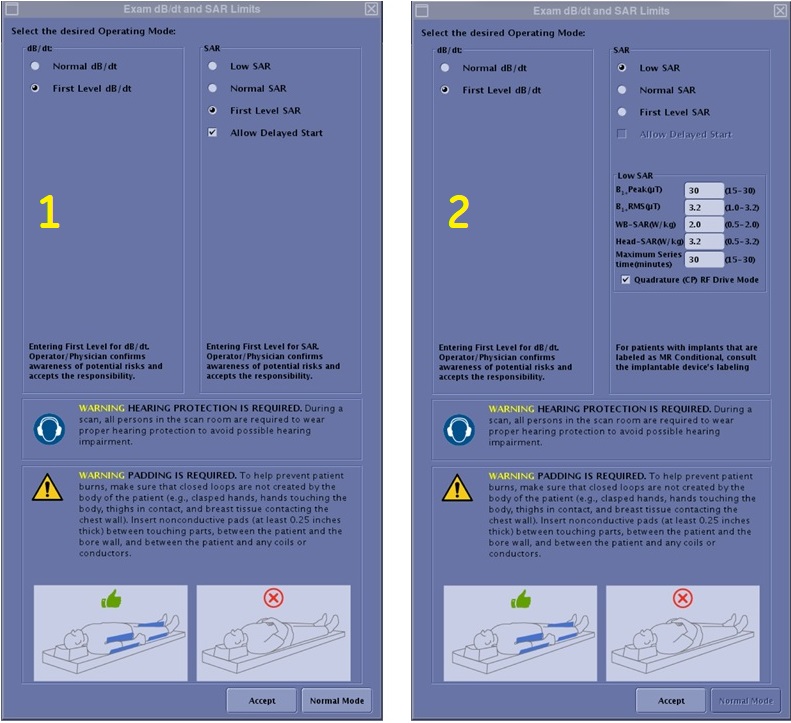
Number Description 1 First Level SAR mode selected. 2 Low SAR mode selected - Proceed to scan the exam.
- If the PSD for a series selected exceeds the Maximum Series time limit entered on the Exam dB/dt and SAR Limits screen, a message appears on the screen. Respond to the prompt: "Series scan time XX minutes, exceeds maximum allowed YY minutes. Please reduce NEX, number of slices, phase encodes or another method to reduce scan time."
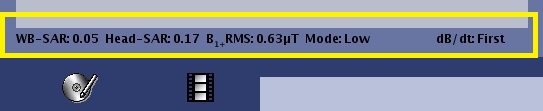
- The SAR and dB/dt information is displayed below the message area on the scan user interface.
Figure 4. SAR and dB/dt area