

- 00000018WIA3097A870GYZ
- id_400232431.3
- Aug 13, 2022 3:31:45 PM
Monitor SAR during an exam
About this task
- During the scan acquisition (not prescan), monitor the 10 sec SAR display. If the 10 sec SAR is exceeding the 6 minute SAR limit and Allowed Delayed Start option is not enabled from the SAR and dB/dt Limits screen, stop the scan and if possible, re-prescribe the protocol with fewer slices or increase the TR. When the Allow Delayed Start option is enabled, it is normal for the 10 second head SAR meter to occasionally exceed the 6 minute SAR limit.
- If the specific energy limit appears likely to trip before the end of the scan, consider revising the scan protocol to reduce the SAR to a level that may go to completion without tripping an accumulative power monitor.
- If a new exam is started with the same patient after a reasonable rest time that is usually 2 hours, the patient’s energy data will be reset.
- If there is a failure to retrieve the patient's energy data, a message is posted on the scan user interface.
Important: This workflow is for a scan session on a patient that has not been scanned within 2 hours.
For more details about SAR term definition, see MR Terminology.
Use these steps to monitor the SAR during an exam and to prevent the MR exam from exceeding the maximum SAR per exam (14.4 kJ/kg = 240 W min/kg).
Step-by-step instructions
- From the footer area of the screen, click
 .
. - From the SAR Display screen, click the arrow in the lower right corner to expand the screen.
Figure 1. Expanded SAR screen prior to scan acquisition 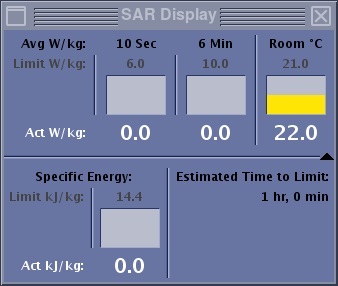
- The Specific Energy bar graph in the lower left panel indicates the cumulative SAR by the patient across scans and examinations that have occurred within two hours. Therefore, it does not represent only a single scan or exam. There are three color codes to the bar:
- Green is for energy less than equal to 50% (7.2 kJ/kg) of the limit (14.4 kJ/kg).
- Yellow is for energy above 7.2 kJ/kg until the estimated time to limit is less than 10 minutes.
- Red is the energy once the estimated time to limit is 10 minutes.
- The Act kJ/kg value shows the actual accumulated energy for the patient. The value reads 0.0 when the patient has not been scanned during the last 2 hours. Usually, a rest time of 2 hours is required to dissipate the absorbed energy from any previous MR scan.
- The Limit kJ/kg values show the limit for the maximum absorbed energy allowed for the patient.
- The Estimated Time to Limit display shows the estimated time to reach the maximum limit, which at the start of a new exam (patient not having been scanned within 2 hours) is 1 hr, 0 min. Note that the Estimated Time to Limit is not the clock time but is the time calculated assuming a maximum energy absorption rate of 4W/kg. The actual scan time to limit will be greater than or equal to the displayed Estimated Time to Limit.
- The Specific Energy bar graph in the lower left panel indicates the cumulative SAR by the patient across scans and examinations that have occurred within two hours. Therefore, it does not represent only a single scan or exam. There are three color codes to the bar:
- If the Estimated Time to Limit reads less than or equal to 10 minutes, the following occurs:
- The SAR icon in the footer area of the screen appears with a red box around it.
Figure 2. SAR icon in footer 
- If the SAR screen was not opened, it automatically displays.
Figure 3. SAR screen when Estimated Time to Limit reads less than or equal to 10 minutes 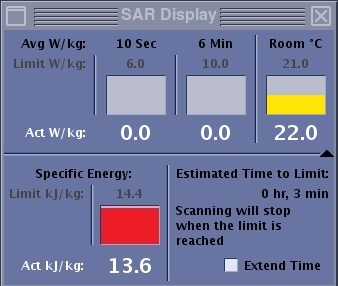
- An extended option appears in the Estimated Time to Limit area for Low and Normal operation modes.
- Do not select the Extended option unless your site guidelines allow for Extended under specified conditions that would apply when the risk to the patient of not having the scan is more than exceeding the regulatory limit. Selecting the Extended option continues the scan even after the limit is reached. This might increase the body temperature above the defined permissible limit.
- If the Extended option is selected the scan does not stop once the limit of 14.4 is reached. Respond to the confirmation prompt to continue scanning. The scan continues until completion or when a limit of 16.8 kJ/kg is reached.
- If the Extended option is not selected, the scan stops upon reaching the limit.
- An extended option appears in the Estimated Time to Limit area for Low and Normal operation modes.
- The SAR icon in the footer area of the screen appears with a red box around it.