The magnet room door must be closed to start scanning and to avoid image quality degradation from RF leaking into the room.
About this task
Use AutoStart to reduce the time the patient spends on the table in the scan room. The localizer can be scanned during the time interval between closing the scan room door and the arrival of the technologist at the console, thus allowing the technologist to prescribe graphic locations for subsequent scans. This time savings can be particularly helpful for claustrophobic patients, children, and patients in pain or discomfort.
Step-by-step instructions
Position and set-up the patient for the exam.
Press Landmark from the table control panel or from the touch and go table strip to set the landmark.
Provide the patient with instructions so that the patient knows that the scan begins once the door is closed.
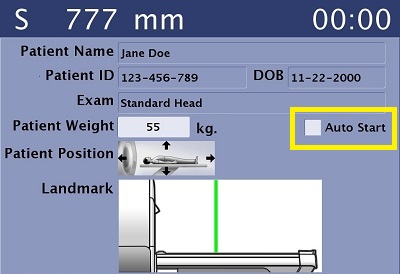
From the in-room display Patient Setup tab, confirm that the Auto Start check box is selected.
Figure 1. Auto Start check box on Patient Setup tab
Press Advance to Scan from the table control panel to move the patient to isocenter.
Result
Start is now active on the magnet control panel.
Start scanning the first series of the exam with one of the following methods.
Leave the room and close the scan room door.
Press Start Scan on the magnet control panel or on the scan console.
To disarm AutoStart, press Stop Scan from either the scan console or the magnet control panel.