

- 00000018WIA303DC970GYZ
- id_400226351.3
- Mar 25, 2022 6:14:29 PM
ViosWorks
ViosWorks Transfer is an integrated feature on the MR host that transfers ViosWorks data to a third party Artery cloud. Exams/series on the MR system are pushed onto an Arterys cloud for post-processing. Clinicians can review the data on any remote PC system via an HTML-based web browser.
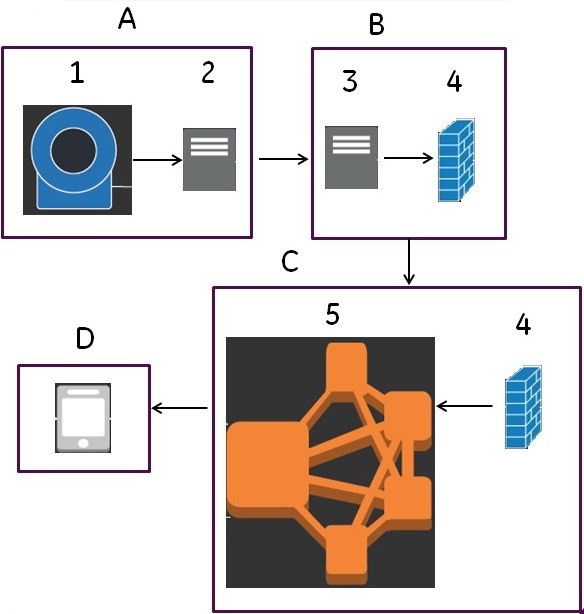
| Item | Description |
|---|---|
| A | MR scanner room. |
| 1 | MR scanner where 4DFLOW scans are acquired. Note: Multiple scanners can share the same PHI service. |
| 2 | MR scanner local network. |
| B | Hospital network. |
| 3 | MR host sends ViosWorks image data to Artery’s PHI server. The PHI server acts as a proxy to Arterys that anonymizes, stores, streams data to Arterys and sends status back |
| 4 | Pixel data. |
| C | Arterys cloud. |
| 5 | Web server. |
| D | User's PC. |
- The PHI server must be added to your MR system network. Contact your service engineer to configure the host computer to communicate with the PHI server.
- PHI service software is licensed from Arterys.
- Customers use their own computers or purchase a computer from GE. A GE Service personnel supported by Customer IT personnel loads and sets-up the PHI server.