- 00000018WIA30EB9870GYZ
- id_400217491.1
- Feb 8, 2022 11:45:30 AM
Protocol Session
Use these steps to open a Protocol Session to view the Protocol work area and to close a Protocol Session.
Prerequisite
To work with protocols, you must belong to the ProtocolEdit group. If you are not assigned to the ProtocolEdit group a message appears when you try to work on a protocol.

Click OK to the message and consult with your site administrator, who assigns roles for each MR user.
Open a Protocol Session
- From the header area of the screen, click the
 .
. - From the System Management work area, click the Protocol Management tab.
- Select a protocol library, protocol tab, and a protocol from the list.
- Click Edit Protocol.
- A session is created that does not have a patient context i.e., patient demographic information associated with it.
- The capabilities within this session are the same as those available in a prescribe-ahead session except that scanning resources are not allocated.
Close a Protocol Session
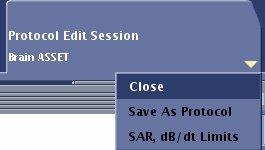
From the Protocol Session tab, click the menu arrow and select Close. Respond to any prompts.