

- 00000018WIA301FE870GYZ
- id_400220151.2
- Aug 21, 2022 3:26:26 PM
PROPELLER T1 FLAIR scan
PROPELLER with T1 FLAIR PSD produces T1-weighted images with null CSF signal and optimal gray/white matter contrast. It is typically used to acquire T1-weighted image contrast for head exams on patients with uncontrollable motion and for free-breathing liver images for patients with an irregular breathing pattern. FLAIR T1 images reduce patient motion, flow artifact and null CSF consistently for all images within the series. Typically use to acquire C-spine and brain images.
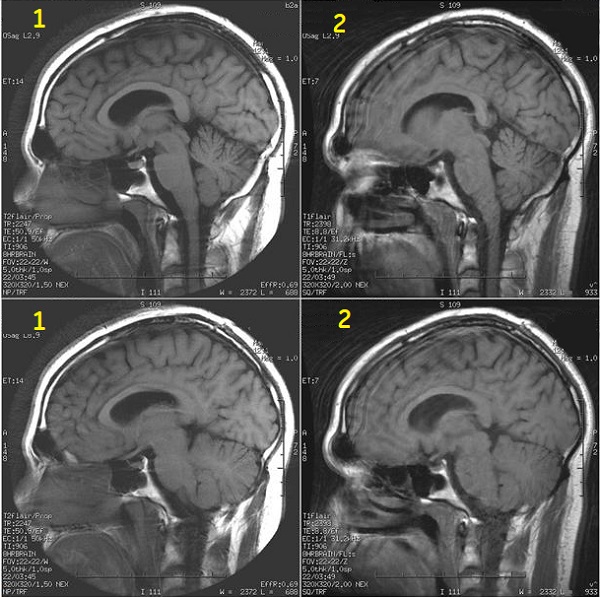
| Number | Description |
|---|---|
| 1 | PROPELLER images |
| 2 | FSE images |
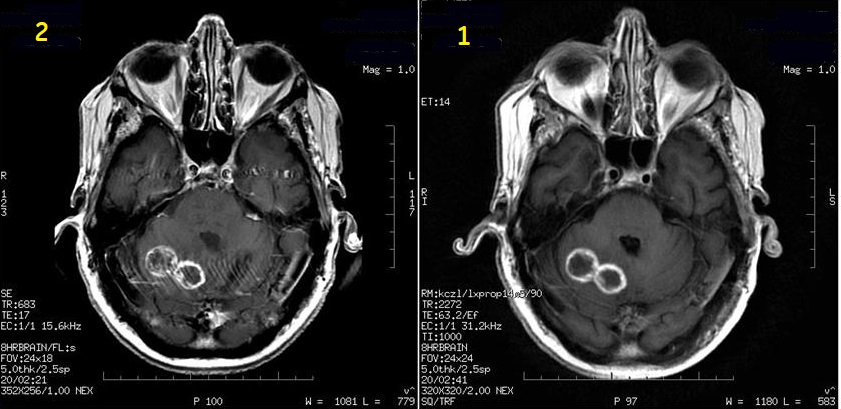
| Number | Description |
|---|---|
| 1 | SE images |
| 2 | PROPELLER post contrast images |
Consider this information when modifying T1 FLAIR PROPELLER scan parameters. For specific scan parameter values, select a protocol from your GE or Site library.
- Scan selections: 2D Mode, Fast Spin Echo family, PROPELLER pulse, T1 FLAIR Imaging Option.
General
- It is recommended that you select a PROPELLER protocol from your site or GE library. If you choose to build one from a template, from the tab, select the desired PROPELLER series and modify the scan parameters.
- Images are annotated T1flair/Prop.
Scan Parameters
- Acquisitions: Adjust scan parameters so that the scan is one acquisition.
- ETL: To minimize streak artifacts and for oblique scans, increase ETL from 12 to 16, reduce the OSF from 2.0 to 1.5, turn Off ARC and place the Frequency direction in the Superior/Inferior direction.
- Flip angle: To optimize image quality, typically select the following refocus flip angles:
- 110° for brain scans at 1.5T.
- 160° for spine scans at 1.5T.
- Frequency Direction: For spine scans, place Frequency in the superior/inferior direction to minimize artifacts.
Figure 3. Frequency A/P and S/I comparison 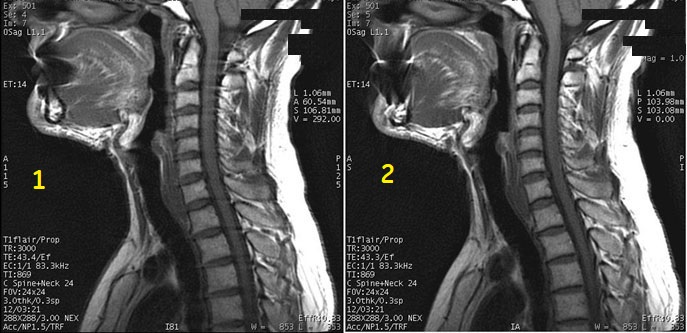
Table 3. Image legend Number Description 1 Frequency A/P with streaks in image 2 Frequency S/I with no streaks in image - To swap phase and frequency rotate the FOV on the sagittal view of the localizer.
Figure 4. Frequency A/P and S/I localizer comparison 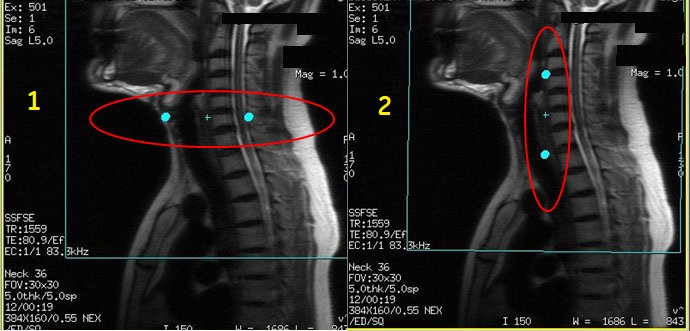
Table 4. Image legend Number Description 1 Frequency A/P in localizer 2 Frequency S/I in localize
- To swap phase and frequency rotate the FOV on the sagittal view of the localizer.
- Harmonize: For T1 FLAIR, PROPELLER scans automatically correct for mild patient motion. For these patients, from the Details tab, Harmonize should be turned off. Only turn on Harmonize if there is gross patient motion.
- Auto TR and Auto TI automatically lock the TR and TI values to provide optimum gray/white matter contrast and suppressed CSF.
- When Auto TR is selected with T1 FLAIR, the Auto TI becomes unavailable for selection and the system sets the TI value that produces the optimum T1 FLAIR contrast.
- If Auto TR is selected, then Auto TI is grayed out and it is automatically set to TR/4 for T2 FLAIR and for T1 FLAIR it grays out the TI field and sets it to the optimum TI for T1 FLAIR contrast.
- Always use Auto TI.
- Set the TR to 3000-3550 ms.
Imaging Options
- Select ARC Imaging Option to reduce scan time. Acceleration (ARC) is available with all scan planes.
- From the Acceleration tab, select a factor of 2 for 8-channel coils.
- When Acceleration is On, select a No Wrap Factor greater than 2.0.