Transmit gains are applied to change the amount of transmit attenuation and allow the appropriate RF energy to achieve the maximum signal. They adjust the transmitting power (amount of RF) the system uses in order to obtain the correct flip angles. A correct transmit gain means that a 90° RF pulse flips the net magnetization vector exactly 90°.
Use these steps during MPS to manually adjust and set the RF Transmit Gain to ensure precise flip angles. This allows the appropriate RF energy to achieve maximum signal.
CAUTION
Auto prescan is used to calibrate the flip angle and to accurately estimate SAR levels. Do not manually adjust the transmit gain for GRE, SPGR, FGRE, FSPGR and FIESTA scans since excessive SAR may result if the TG is set too high. Using Auto prescan rather than manual prescan insures that accurate SAR limits are used.
Step-by-step instructions
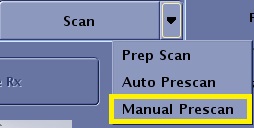
From the Worklfow Manager control panel, Scan menu, click Manual Prescan.
Figure 1. Scan menu
From the Manual Prescan screen, in the Transceiver Hardware Settings area, click Transmit Gain (TG).
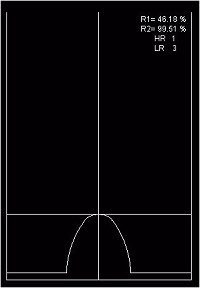
From the Manual Prescan menu bar, click Markers > Horizontal Hairline.
The marker is a toggle: select it once to turn it on and click again to turn it off.
Use the marker to mark the height of the image profile each time you change the gain.
Figure 2. Horizontal line marks image profile height
To adjust the gain, place the marker at the peak of the profile and move the Transmit Gain slider in increments of 10 to 20 initially, and then 5 to 10 as you get closer to the peak value.
After you have adjusted the gain, wait for the system to apply three passes before you move the marker to the profile’s peak.
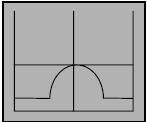
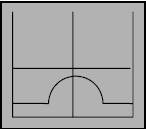
Continue this process until you see the profile fall below the marker. When that occurs, you have surpassed the optimum Transmit Gain setting and you must go back and find the gain that places the profile at its highest peak.
Figure 3. If the peak increases, the magnetization is moving closer to the transverse plane.Figure 4. If the peak decreases, the magnetization is moving away from the transverse plane.