

- 00000018WIA302A8870GYZ
- id_400218101.4
- Aug 12, 2022 2:45:30 PM
Auto Prescan
APS automatically adjusts the center frequency and the transmit and receive gains. These values appear in the message area upon completion of a successful APS. Use APS for the most efficient, accurate, and consistent prescan.
It also includes a calibration scan for tasks that have a PURE filter, an ASSET imaging option, or both.
Each time a new series is prescanned, the system attempts to use the previous prescan data (within the exam) to make the prescan calculations for center frequency, transmit gain, and receive gain. For this reason, prescan time varies from one series to the next.
During APS, the system may fail to automatically calibrate the RF power transmitted and received in a slice. If an error is detected, the message, "Prescan Failed" displays, followed by a reason.
- Auto Prescan is selected from the Scan menu.
Figure 1. Scan menu 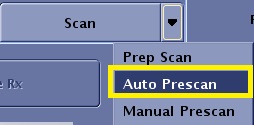
- Auto Prescan acquires calibration scan data if the following parameters are selected in the series.
- PURE
- ASSET
- HyperBand
- AutoPrescan acquires coil calibration scan data.
- If APS fails and the system can determine the cause, the "Prescan Failed" message contains additional information. Two common messages and problems are:
- "Auto Prescan Failed. Table not at scan plane." The solution to this problem is to press the Move to Scan button to move the table to scan plane. Then try to Auto Prescan again.
- "Auto Prescan Failed. RF amplifier not ready." To correct this problem, wait for the RF amplifier ready message to appear in the message area.
- In certain Center Frequency prescriptions, fat and water peaks may not be readily discernible. In such cases, the system displays "Please verify CF peak", in addition to the prescan values displayed. The prescan values and the following message are displayed in the error log, "Please verify Center Frequency peak". At this point, the MRI system requires an MPS to find the desired peak.
- It is advisable to turn Auto Scan off when the fat and water peaks may not be discernible. The "Please verify CF peak" message is only displayed for a short time in the Scan Operations area and may be missed when Auto Scan is on.
- An improperly connected coil may result in a failed prescan with the message, TR Driver Fault. Check coil connections before proceeding with prescan.