Use these steps to change the SAR or dB/dt levels that were set when the exam was first launched.
Step-by-step instructions
From the Scan Session tab, click Preferences.
On the Exam Preferences screen, click SAR, dB/dt...
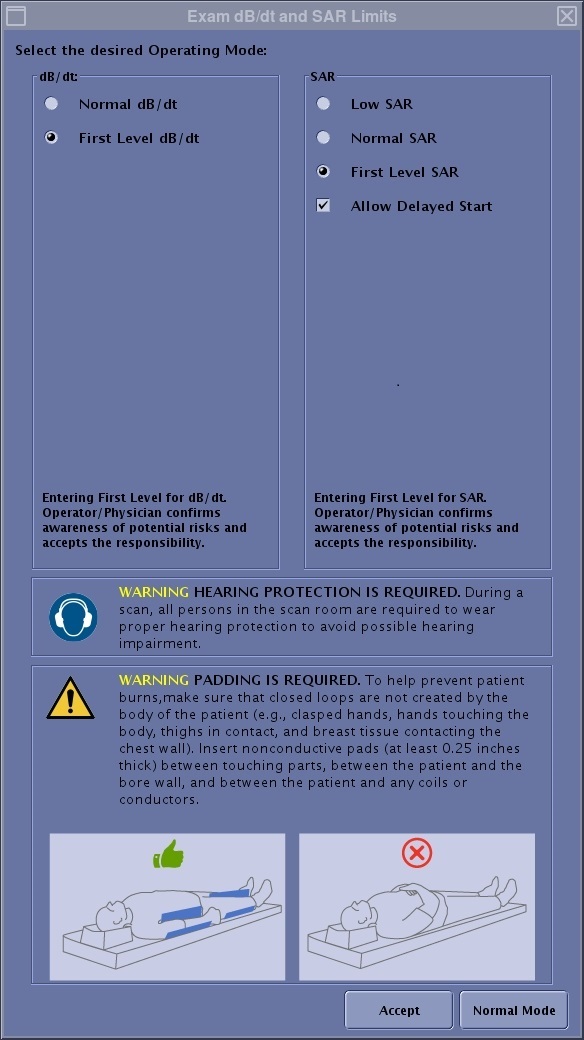
On the Exam dB/dt and SAR Limits screen, change the levels to the desired level.
Figure 1. Exam dB/dt and SAR Limits screen
If the regulatory limit for SAR is reached, the scan pauses and you must wait until the 6-minute SAR average is within regulatory limits to complete the scan. The current series is lost or paused (depending on the sequence), but all completed series are saved. In addition, you must wait until the SAR is within the regulatory limit before you are allowed to restart the series.
An override of 14.4 kj/kg is allowed in low SAR and normal operating modes; however in first control mode and second control mode no override will be allowed. An override is allowed when Low SAR or Normal SAR operating modes are selected from the Exam dB/dt and SAR limits screen.
The Low SAR option cannot be changed once an exam begins. The other SAR modes retain normal behavior in that they can be moved up; for example, you can move from Normal mode to First level mode within an exam.
Click Accept to apply the changes to the remaining series in the Workflow Manager and click Close to exit the Scan Preference screen.