
• Object ID: 00000018WIA30558870GYZ
  • Topic ID: id_40021989 Version: 1.3
  • Date: Apr 15, 2022 2:42:15 AM

Receive Gain

About this task

Receive gain adjusts the analog and digital receivers for the level of signal returning from the patient. The receiver must be able to convert or translate the MR signal coming from the patient into a useful electronic signal. Signal exceeding the translation range of the receiver cannot be converted and becomes noise, like a radio playing too loudly. Scan TR can be adjusted to maximize receive gains and achieve the best SNR. The various adjustments are made in order to move the location of the bandwidth, and more importantly, the center frequency line (AX), where AX represents actual frequency to the center of the spectrum.

Scan TR (R1 and R2) are used to adjust the receive gains:

  • R1: Analog Gain
  • R2: Digital Gain

Improper adjustment of R1 and R2 settings results in distortion and possible image quality degradation. If R1 and R2 are set too high, contrast reversal effects can occur. If R1 and R2 are set too low, a low SNR can occur.

Use these steps during MPS to manually adjust and set the Scan TR to optimize the use of the receiver’s dynamic range (receive gain). This procedure guides you through the process of adjusting the receive gain to achieve the best SNR.

Step-by-step instructions

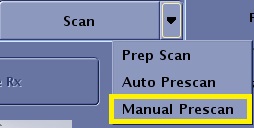
  1. From the Worklfow Manager control panel, Scan menu, click Manual Prescan.
    Figure 1. Scan menu
  2. From the Manual Prescan screen, in the Transceiver Hardware Settings area, click Scan TR (R1/R2).
  3. Adjust the Analog Gain (R1) slider so that the signal level at the spectrum display window R1/R2 is below 50%.
  4. Adjust the Digital Gain (R2) slider so that the signal level at the spectrum display window R1/R2 is below 50%.
  5. To view the prescan values for a specific receiver, click the Receiver slider and select the desired receiver.
  6. Click Done when you are satisfied with all Manual Prescan selections.