

- 00000018WIA30958970GYZ
- id_400246251.3
- Mar 28, 2022 3:45:34 PM
Fuse tracts with other objects and then hide/show the objects
About this task
Step-by-step instructions
- Hide (eye closed icon) or show (eye open icon) any of the display options.
Figure 1. Examples of various objects hidden/shown 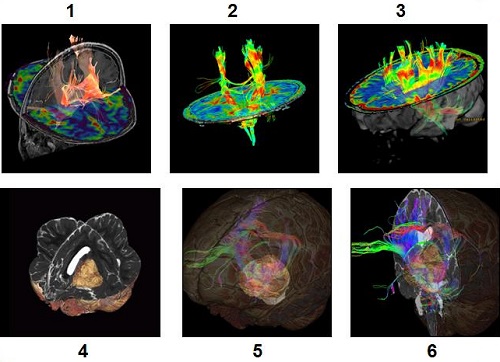
Table 1. Image legend Number Description 1 Fiber tracts with standard color scheme merged with rCBV map and T1 BRAVO. 2 Fiber tracts with FA color scheme merged with FA map. 3 Fiber tracts with FA color scheme merged with FA map and 3D image. 4 Auto Contoured tumor added to fiber tract image (use Add ROI feature), tracts hidden and merged with a volume rendered 3D image. 5 Tumor and fiber tract shown and merged with volume rendered 3D Cube T2 image. 6 Tumor and fiber tract shown and merged with volume rendered 3D Cube T2 image.