- 00000018WIA30548870GYZ
- id_400263441.4
- Aug 12, 2022 3:13:10 PM
Center Frequency Coarse
About this task
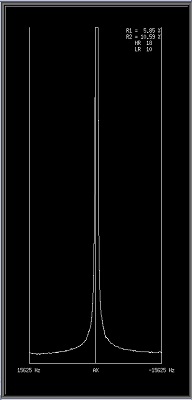
Use these steps during MPS to manually adjust and set the Center Frequency Coarse to the patient. This allows you to tune the system for optimal sampling of the individual patient and anatomy. The course adjustment allows you to view the spectrum, regardless of its location, compared to the current bandwidth location. Fat and water may appear as one peak when viewed in this frequency range.
Coarse center frequency adjustments can be made on a usable bandwidth frequency range:
Step-by-step instructions
- From the Worklfow Manager control panel, Scan menu, click Manual Prescan.
Figure 1. Scan menu 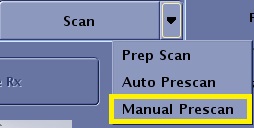
- Slide the Delta Frequency (DX) slider to adjust the center frequency.
- The value that appears above the slider indicates the difference in frequency of the slider and the center frequency. This value is reported in Hertz.
- Each time a frequency number is applied, the value is cumulative.
- A negative number moves the peak to the right. If the transmit frequency is too low, add frequency.
Figure 2. The transmitting frequency of the system (1) is higher than the precessional frequency of the patient (2). 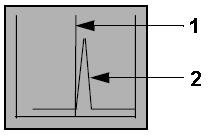
- A positive number moves the peak to the right. If transmit frequency is too low, add frequency.
Figure 3. The transmitting frequency of the system (1) is lower than the precessional frequency of the patient (2). 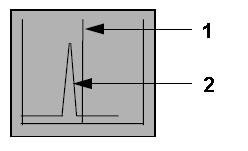
- A negative number moves the peak to the right. If the transmit frequency is too low, add frequency.
- Click Apply next to the Delta Frequency (DX) slider to activate your selection.
Figure 4. Example of an adjusted Center frequency