Use this workflow to manually adjust the center frequency, transmit gain, and scan TR. This is useful when APS fails, the system has difficulty self-adjusting, or for chemical saturation techniques.
Step-by-step instructions
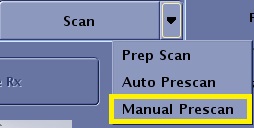
From the Worklfow Manager control panel, Scan menu, click Manual Prescan.
Figure 1. Scan menu
From the Manual Prescan screen, consider the following.
Sliders are used to enter manual prescan values for center frequency, and transmit and receive gain adjustments. The various adjustments are made in order to move the location of the bandwidth and, more importantly, the center frequency line (AX). The AX text field represents the actual frequency to the center of the spectrum.
Click the Rec slider to select a coil receiver of the coil currently plugged into the system.
The spectrum or prescan profile are correlated with the selected coil receiver. Therefore, when a coil receiver is selected from the menu, the spectrum or prescan profile change accordingly.
Use this feature to:
check the signal from individual coils on a multi-channel coil
select the coil receiver that produces the greatest signal
trouble shoot a coil problem by checking the signal strength from each coil receiver
Match the Center Frequency Coarse to the patient.
Adjust the Transmit Gain.
To protect surface coils, the TG limit may be less than 200.
Match the Center Frequency Fine to the patient.
Adjust the Receiver Gain, which is the Scan TR.
When all Manual Prescan actions are completed, click Done to exit the Manual Prescan screen.