- 00000018WIA30DCF090GYZ
- id_20387581.1
- May 16, 2022 4:49:45 PM
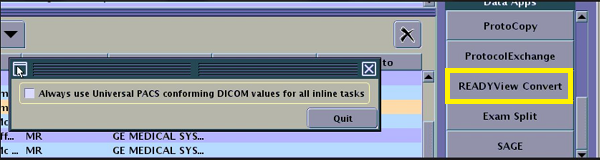
READY View convert
The READY View Convert Application is a preference setting to automatically use the Universal PACs conforming DICOM values for all DWI scan post-processing tasks.
Before you begin
- AvDC: Average Diffusion Coefficient
- FA: Fractional Anisotropic
- Vol Ratio (Aniso): Volume Ratio Anisotropic
- Exp. Attenuation: Exponential Attenuation
- Aniso Index: Anisotropic Index
- ADC (mm2/sec): Apparent Diffusion Coefficient
- eADC: enhanced Apparent Diffusion Coefficient
- ADC (m2/sec): Apparent Diffusion Coefficient
About this task
Step-by-step instructions
- From the header area of the screen, click the Image Management icon (
 ).
). - From the Image Management Data Apps list, click READYView Convert to open the READY View Convert screen.
Figure 1. READY View Convert screen