

- 00000018WIA30718970GYZ
- id_400245031.3
- Mar 16, 2022 6:55:10 PM
Save as quantitative maps consideration
When some series are loaded into certain viewers, the WW/WL varies based on if Save as quantitative maps was turned on or off. The issue is related to Viewers that cannot accomodate decimal values for WW/WL. Click the Save Functional Volume icon on the Export menu to display the Save Functional Volume screen.
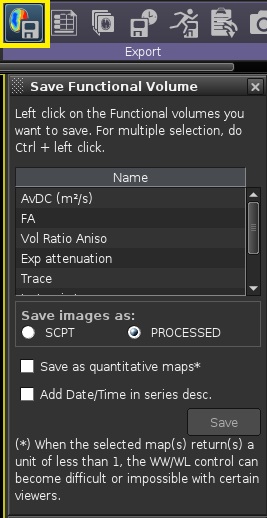


It is recommended to uncheck the Save as quantitative maps box when maps (identified as italic, bold-face items in the following table) are displayed in Viewers that cannot accommodate decimal values.
| ADC Maps | DTI Maps | Advanced DTI Maps | Brainstat Maps | MR Standard, SER Maps | MR-Touch Maps |
|---|---|---|---|---|---|
| ADC MM2 | AvDC | Relative Aniso | RCBV | MSI | ST8K |
| eADC | FA | Surface / Average Aniso | RCBF | MSD | ST20K |
| ADC M2 | VRA | Volume / Average Aniso | MTT | EI | STGRY |
| ADC Micro MM2 | EATT | Volume / Surface Aniso | TTP | TTP | ST8KM |
| ADC2 MM2 | TRACE | Dxx Diffusion Coefficient | BAT | MTE | ST20KM |
| eADC2 | ISO | Dxy Diffusion Coefficient | TMAX | MSI | STGRYM |
| ADC2 M2 | x_axis | Dxz Diffusion Coefficient | MTTSVD | PEI | ATTEN |
| ADC2 Micro MM2 | y_axis | Dyy Diffusion Coefficient | SER | ||
| z_axis | Dyz Diffusion Coefficient | T2*, T2: | |||
| ANISOINDEX | Dzz Diffusion Coefficient | R2* (Hz) | |||
| ANISO | Surface DC | T2* | |||
| Volume DC | T2 | ||||
| Magnitude DC | |||||
| Minimum Eigen value | |||||
| Middle Eigen value | |||||
| Maximum Eigen value |