

- 00000018WIA3061E870GYZ
- id_400218211.3
- May 22, 2022 11:28:26 AM
Phase sensitive MDE
Use these steps to acquire PSMDE images that enhance the image contrast between infarct and normal myocardium, even with a sub-optimal TI time.
In comparison to 2D MDE scans, Phase Sensitive MDE scans :
- Provide a quick viability assessment for differentiating myocardial infarcts and viable/normal myocardial tissue.
- Is less sensitive to the selected TI value, which provides a wider range of TIs under which myocardial nulling is effective. It can therefore reduce the number of repeat MDE scans.
Figure 1. PSMDE images showing multiple acceptable TI times that null myocardium 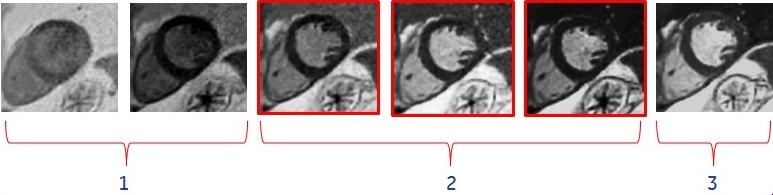

Table 1. Image legend Number Description 1 TI too short. 2 Multiple acceptable TI times. Note that no bounce point artifact, , is seen in PSMDE images 3 TI too long. - Achieves a better contrast between infarct and normal myocardium when acquired with a less than optimal TI time.
Figure 2. Heart comparison images 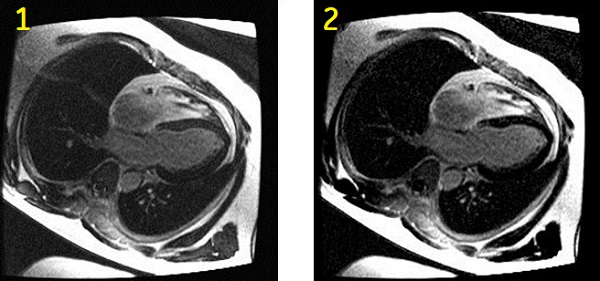
Table 2. Image legend Number Description 1 Magnitude myocardial delayed enhancement image. Shorter than optimal TI time selection results in incomplete myocardial suppression and grey-like myocardial signal. 2 Phase-sensitive myocardial delayed enhancement image. Improved myocardial suppression (darker myocardial signal) is achieved despite shorter than optimal TI time selection. - Setup the patient. For details, see:
- ECG gated exam procedure.
- Cardiac coil procedure.
- The recommended patient position is supine and feet first. This ensures accurate cardiac gating/triggering and patient safety by properly routing the gating cables out of the bore and properly routing the coil cable to the coil port carriage.
- Open a scan session.
- Select a GE or Site cardiac protocol with a PSMDE (Phase Sensitive) and a Cine IR series.
- Acquire a 3-Plane localizer and all other series including long and short axis cine images.
- Prior to the PSMDE series acquisition, from the Workflow Manager, select the CineIR series and click Setup. The CineIR scan is used to select the optimum TI time for myocardium suppression.
- From the Cardiac tab, select an RR interval that will also be used for the PSDME scan. The PSMDE and the Cine IR RR intervals must match.
- PSMDE scans are compatible with 2, 3 and 4 RR interval, just like Cine IR.
- Graphically prescribe a single short axis scan to visualize myocardium.
- When the prescription is finished, click Save Rx.
- Click Scan to acquire the Cine IR localizer images.
- From the Cardiac tab, select an RR interval that will also be used for the PSDME scan. The PSMDE and the Cine IR RR intervals must match.
- From the Workflow Manager, select the PSMDE series and click Setup.
- Confirm that the PSMDE scan is a 2D Mode, Gradient Echo family, Fast GRE pulse, and Phase Sensitive and Cardiac Gating are selected as Imaging Options.
- The PSMDE scan is an inversion based, segmented, cardiac gated, dual acquisition, non-single shot FGRE acquisition. The first acquisition in the first R-R interval captures the inversion prepped data set. The second acquisition in the second R-R interval captures the reference data set used to assess background phase for phase sensitive reconstruction.
- PSMDE is not compatible with a No Phase Wrap value greater than 1.0.
- TE is not selectable and is automatically set to Minimum Full.
-
Note: that the Temporal Resolution is displayed on the Scan Parameters screen.
- For more details about Phase Sensitive, see Imaging Option Phase Sensitive.
- Protocol suggestions:
- Flip Angle = 25°
- Imaging Option = ASSET, Acceleration tab R = 1-1.5
- 1.5T Bandwidth = 20kHz
- Intensity Correction = PURE if it is available
- If any or all of these scan parameters are selected (ASSET, HyperBand, PURE), and if you select On from the Calibration in Prescan menu, which is located on the Details tab, a calibration scan is acquired during Auto Prescan.
- If the SNR is unacceptably low, modify the scan parameters to create a larger voxels: increase the slice thickness or FOV, or reduce the Bandwidth.
- Select a TI time that demonstrates the optimal myocardium contrast.
- Review the Cine IR images in Auto View to select the TI. The Cine IR images provide an evolution of T1-contrast based on the TI time of each phase.
- The optimal TI becomes longer as contrast washes out over time. Therefore, increase the TI by approximately 20 ms for every 5 minute delay from the contrast injection. If you are uncertain of the optimum TI, re-acquire the Cine IR scan and make a TI adjustment as needed.
- Click the Gating tab and select gating parameters.
- 2D MDE and PSMDE have the following options for Trigger Delay: Minimum, Recommended, Systolic and Diastolic. Select Diastolic trigger delay, for example, with a heart rate of 60 BPM, select 600 ms.
- For a normal heart rate, ensure that the temporal resolution is below 200 ms.
- For a heart rate greater than 100 BPM, to keep the temporal resolution below 150 ms, decrease the Views per Segment or the Phase value on the Details tab. Set the #RR = 4.
- Graphically prescribe the locations.
- Copy the slice prescription exactly from a FIESTA CINE series (location, thickness, etc) for cross-reference purposes.
- Confirm that the PSMDE scan is a 2D Mode, Gradient Echo family, Fast GRE pulse, and Phase Sensitive and Cardiac Gating are selected as Imaging Options.
- When the prescription is finished, click Save Rx.
- Click Scan to acquire the PSMDE images.
-
Note: that the phase sensitive images are annotated as PS and the magnitude images are annotated as MAG on the image, the series text page and the patient list.
- The phase images are series N (the original series) and the Magnitude images are series N*100.
-
- Setup the patient. For details, see: