

- 00000018WIA30656970GYZ
- id_400231171.2
- Feb 24, 2022 8:43:56 PM
PC: with Cine mode scan
FastCINE is a scan mode that uses a PSD from the GRE family with Cardiac Gating Imaging Option and a value entered for # of phases to reconstruct on the Cardiac tab. The PSD can be a Fast GRE/SPGR or Fiesta acquisition with the # of Cardiac Phases to Reconstruct set to a specific value, typically 20 to 24. It is acquired in the 2D mode and not Cine.
FastCINE allows segmented k-space which allows for short breath-hold scan times. The k-space segmenting technique reconstructs all phase steps regardless of when they are acquired within the cardiac cycle. This allows for complete imaging of the RR interval allowing better visualization of end diastolic events. The variable view sharing technique reconstructs images at different delay times within each cardiac cycle depending on a temporal phase position that varies with the heart rate. It combines the strengths of Fast Card and Cine for shorter scan times and imaging through the cardiac cycle.
The RR Interval is monitored and the information is used to retrospectively sort the data before reconstruction. Images are reconstructed using Cine interpolation that compensates for differences within the cardiac cycle. FastCINE uses a segmented k-space technique.
This PSD combines Phase Contrast and the Cine scan mode to enable data acquisition throughout the entire cardiac cycle. The RR Interval is monitored and the information is used to retrospectively sort the data before reconstruction. Images are reconstructed using CINE interpolation that compensates for differences within the cardiac cycle.
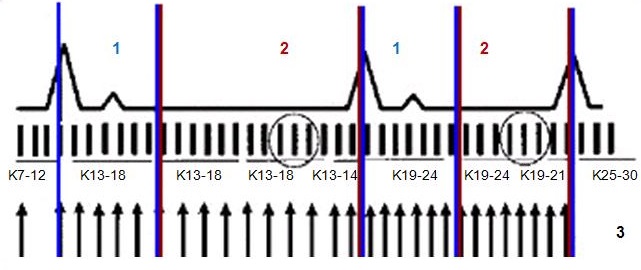
| Number | Description |
|---|---|
| 1 | Systole |
| 2 | Diastole |
| 3 | Phases |
Use FastCINE PC:
- to determine blood flow direction
- to estimate flow velocity
- for quantitative analysis in Flow Analysis software
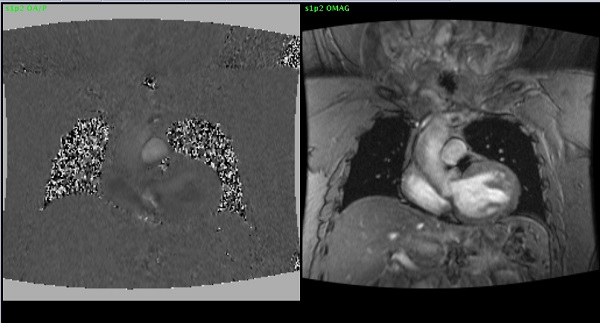
- Scan selections: Cine mode, Vascular family, Phase Contrast pulse.
User CVs
Click the Advance tab to view the available User CVs. The CVs may vary based on the field strength and selected scan and imaging parameters.
Post-process tasks
There are multiple compatible post-process tasks. For details, see Add post-process task.
- Image Enhancement Filters
- Negative Enhancement Integral MRSTD
- Pasting (only if series are linked)