

- 00000018WIA3007F870GYZ
- id_400246161.2
- Feb 24, 2022 4:39:09 PM
Cine tab
The Cine tab only appears if the protocol has the Cine Imaging Mode selected with a GRE, SPGR, or Phase Contrast pulse sequence.
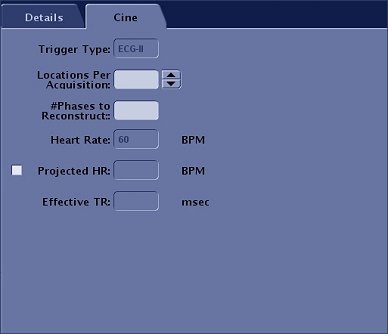
| Parameter | Description |
|---|---|
| Trigger Type | Displays the gating sensor selected from the Waveform and Gating Selection area of the Gating Control screen. This field cannot be edited or stored in a protocol. Make your gating selection from the Gating Control screen during patient setup. That selection remains active until it is changed. |
| Locations Per Acquisition | In the Locations Per Acquisition text box, type in the number of slice locations to acquire in each acquisition. The minimum and maximum values are displayed next to the text box.
The number of locations per acquisition affects scan time, the Effective TR, and contrast between blood and muscle tissue. As the number of locations per acquisition increases, the Effective TR increases and blood/tissue contrast decreases. Consider two slice locations per acquisition to produce images exhibiting the best compromise between image quality. |
| # Phases to Reconstruct | In the # Phases to Reconstruct text box, enter the number of cardiac phases to obtain; up to 32 phases per cardiac cycle for each slice.
Image quality may decrease as the number of cardiac reconstructed phases increases. Sixteen is a typical number and a compromise between image quality and the need for an adequate number of phases. |
| Heart Rate | Displays the patient's heart rate. The heart rate is automatically updated at 5 second intervals only if the Cardiac tab is open. This is not an editable field.
If you copy/paste a series from the Workflow Manager, the heart rate is copy and pasted along with all other scan parameters. Therefore, if you anticipate the heart rate is going to change, open the Cardiac tab so that the Heart Rate field updates every 5 seconds. |
| Projected HR | Type in a projected heart rate in the text box, if necessary for the exam. For example, stress exams or when you want to scan with a specific heart rate due to a significantly fluctuating heart rate. |