

- 00000018WIA30058870GYZ
- id_400218701.4
- Aug 12, 2022 3:24:03 PM
Center Frequency Fine
Use these steps during MPS to manually adjust and set the Center Frequency Fine CFL to the patient. This allows you to fine-tune the system for optimal sampling of the individual patient and anatomy. When the Center frequency fine is viewed, the spectrum often has a fat and a water peak. You can center the spectrum’s midpoint on the desired location. Center frequency fine adjustments are made on a usable bandwidth frequency range of
- From the Worklfow Manager control panel, Scan menu, click Manual Prescan.
Figure 1. Scan menu 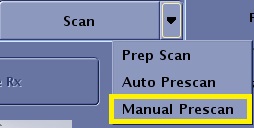
- From the Manual Prescan screen, in the Transceiver Hardware Settings area, click the MPS menu and select Center Frequency Fine.
- Slide the Delta Frequency (DX) slider to adjust the center frequency.
- The value that appears above the slider indicates the difference in frequency of the slider and the center frequency. This value is reported in Hertz.
- The only difference between this program and the CF Coarse program is the width of the spectrum window. It has changed from
- The change in frequency spread allows you to see both the fat and water peaks.
- A negative number moves the peak to the left. If the transmit frequency is too high, subtract frequency.
- A positive number moves the peak to the right. If transmit frequency is too low, add frequency.
Figure 2. Transmit Frequency Optimized for Water 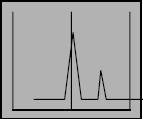
Figure 3. Transmit Frequency Optimized for Fat 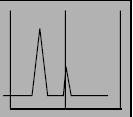
- Click Apply.
- To return the Actual Frequency (AX) to its original value, click Reset all at the bottom of the manual prescan screen.