- 00000018WIA309DF770GYZ
- id_400252771.2
- Mar 10, 2022 11:33:33 AM
Save WW/WL presets for functional map protocols
About this task
Once a functional maps calculation is completed and the maps are displayed, you can adjust the color scale type and/or the WW/WL setting for the current map in the viewport. These changes are saved and become the preset for this type of map in the current Review Step.
Note: Certain types of functional maps do not allow modification of their color scale display, for example, Colored Orientation with DTI. For such maps, the Color Scale Settings option cannot be selected.
Note: The change applies to the selected map inside the Review Step or Protocol that was opened when the change was made. For example, saving an ADC (10-6 mm2/s) map preset in the T2 FLAIR/ADC review step inside the MR Brain will not affect the ADC (10-6 mm2/s) map preset in other factory or custom review steps or protocols generating that type of map.
Step-by-step instructions
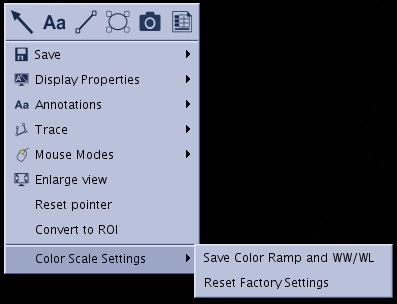
- Select Save Color Ramp and WW/WL.
Figure 1. Right-click menu