

- 00000018WIA307B8970GYZ
- id_400231151.2
- Mar 11, 2022 9:41:21 AM
Process multiple ADC series
About this task
Use these steps with a READY View session that has 2 or more DWI series within an exam. This procedure allows you to generate a second ADC Review Step that is then displayed on the List of Review Steps bar.
Considerations
- All processing in the ADC and ADC2 review steps can be done independent of each other. For example, setting thresholds, EPI-Correction, confidence intervals etc.
- The ADC processed volume names in the Save Functional Volume menu display the same names as the review steps.
Figure 1. Save Functional Volume screen 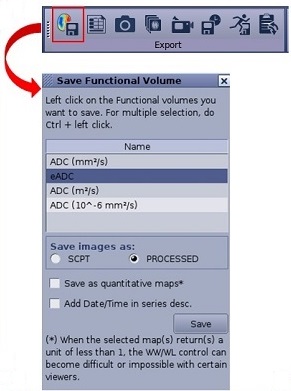
- For more details about Save as quantitative maps option, see Save as quantitative maps consideration.
Step-by-step instructions
- When multiple DWI series are selected, to launch READY View with the desired series, a Select Series screen opens instructing you to select the series for the first ADC review step.
Figure 2. Example of Select Series screen with ADC series list 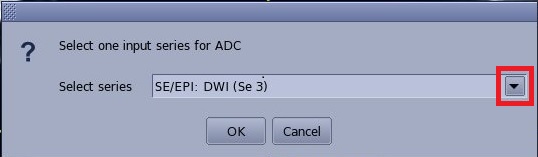
- Click the arrow and select the desired series from the menu.
- Click OK.
- The selected series is loaded into the ADC Review Step.Note: that you can only click the ADC Review Step once and have the Select Series screen appear.
- The selected series is loaded into the ADC Review Step.
- To load the second ADC series, follow these steps.
- Click the ADC2 Review Step from the List of Review Steps bar.
Figure 3. ADC2 Review Step 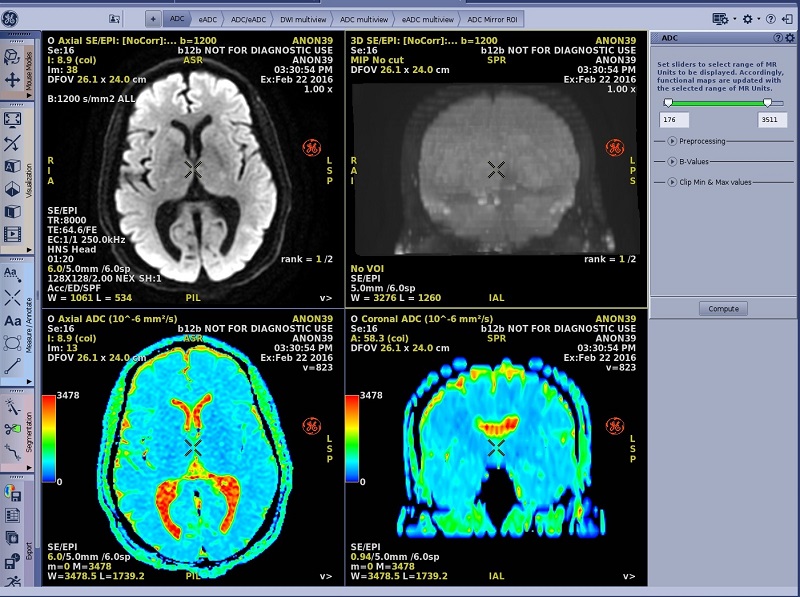
- The Select series dialog screen appears if more than 2 DWI series were originally selected for the READY View application.If there are only 2 DWI series originally selected for the application and you selected one of the series for the first ADC Review Step, then the second DWI series is automatically selected for ADC2 Review Step. In this instance, the Selection series dialog screen does not appear.
- Click the arrow and select the desired series from the menu.
- Click OK.
- The selected series is loaded into the ADC2 Review Step.Note: that you can only click the ADC2 Review Step once and have the Select Series screen appear.
- The selected series is loaded into the ADC2 Review Step.
- Click the ADC2 Review Step from the List of Review Steps bar.