Use these steps to prescan a spectroscopy acquisition after a spectroscopy prescription is saved and the Spectro Prescan button displays.
Step-by-step instructions
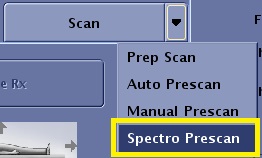
From the scan control area, click the Scan arrow and select Spectro Prescan to open the Spectroscopy Prescan screen.
Figure 1. Scan menu
Customize the display for the prescribed acquisition.
Entry Point = single1, Top Display: Pure Absorp = Hz, Bottom Display: I Chan Raw = Pts
Data generated during any spectroscopy prescan acquisition can be optionally saved for independent analysis. Click the Save option box to activate a continuously updated save mode.
Every set of data displayed on the screen is stored to the file /usr/g/mrraw/SpectroscopyPrescanRawData.h5.
Only one frame-worth of data is saved. If the Entry point is set to single1 it means that each update of data to the screen overwrites the previous data. If the Entry point is set to avg, it means that the average of all the data acquired since the Start button was pressed is written to the file when the data is updated to the screen, overwriting the previous data. Only one file is maintained: that is, it does not follow the P-file strategy of auto-incrementing a run number. Each set of data that you want to retain needs to be copied prior to pressing the Start button on the Spectro Prescan page again.
Click Start.
Every 2 to 5 seconds, a raw echo displays in the bottom display window and a pure absorption spectrum displays in the top window.
The display continues to update every 2 to 5 seconds until you click Stop.
Adjust the phase and resolution of the pure absorption spectrum in the top display window.
Zero Order Phase = adjust as needed to optimize the peak shape, First Order Phase = adjust as needed to optimize the peak shape, Line Broadening = 2
Once you are satisfied with the spectral display, click Stop.
Change the Entry Point to avg and press Enter.
Click Start to acquire and display the data.
Every 2 to 5 seconds, the raw echo is displayed in the bottom display window and the pure absorption spectrum displays in the top window.
The display continues to update every 2 to 5 seconds until 32 excitations have been acquired.
When the acquisition is completed, the following message appears: Data Acquisition has been stopped.