

- 00000018WIA30296970GYZ
- id_400268601.1
- Feb 24, 2022 4:25:09 PM
PC: Post-process task
Step-by-step instructions
- From the Add Post Processing Task screen, select Phase Contrast Correction.
Figure 1. Add Post Processing Task screen 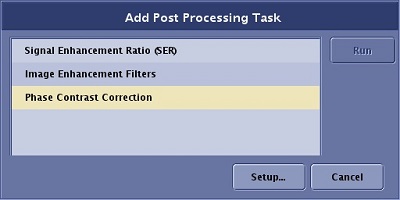
- From the Phase Contrast Correction setup screen, complete the following.
Figure 2. Phase Correction setup screen 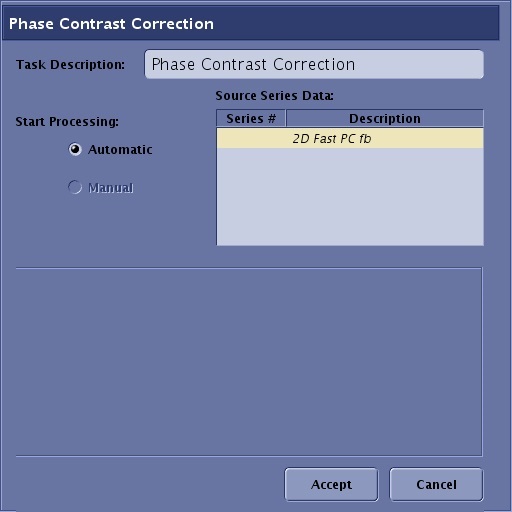
- Type and enter a new name in the Task Description text box, if desired.
- Click Automatic option button.
- Click Accept.
- Proceed to scan the series.
- The corrected images are stored in a new series and the original uncorrected images are in a different series.
- The SCPC series number = 100*Original series number.
- Images are annotated FL:H.
Figure 3. SCPC image annotation 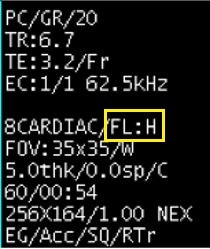
Figure 4. Original 2D Fast PC and SCPC comparison 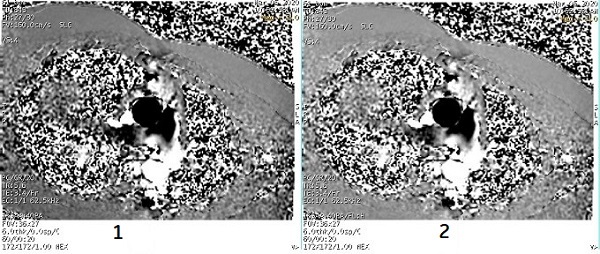
Table 1. Image legend Number Description 1 Original oblique sagittal 2D Fast Phase Contrast image 2 SCPC image. Note the difference in phase on static tissue of the chest walls
- The corrected images are stored in a new series and the original uncorrected images are in a different series.