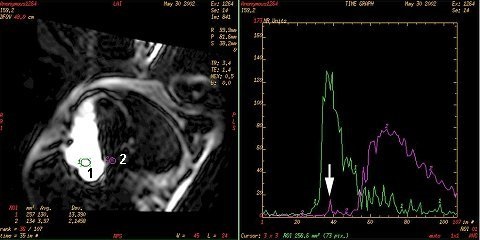
Real Time scans with the IR Prepared Imaging Option turned on can be used for detection of PFO. When the patient performs the valsalva maneuver, the blood flow shunt between the atria is elicited. If the realtime scan is acquired during the valsalva maneuver, the shunt can be imaged. IR-Prepared provides the necessary T1-weighted contrast. High temporal resolution is required with these scans because the shunt duration is typically less than one second. Achieve high temporal resolution by trading off high spatial resolution. A large FOV and slice thickness, small matrix values, and fractional NEX may be necessary to achieve the desired temporal resolution of four frames per second.
Blood clots traversing a PFO can be contributors to cerebral emboli, particularly with young patients. PFOs are difficult to identify because the transient amount of shunted blood is small and the shunt can only be visualized when the patient bears down using a valsalva maneuver. Therefore, this evaluation is performed using real time scanning.
Step-by-step instructions
Explain the valsalva maneuver.
Carefully explain that the patient must bear down for 20 seconds and then release and begin breathing normally.
Since this maneuver must occur during real time scanning, which is very noisy, providing the patient with a hand signal to start and stop the maneuver is critical.