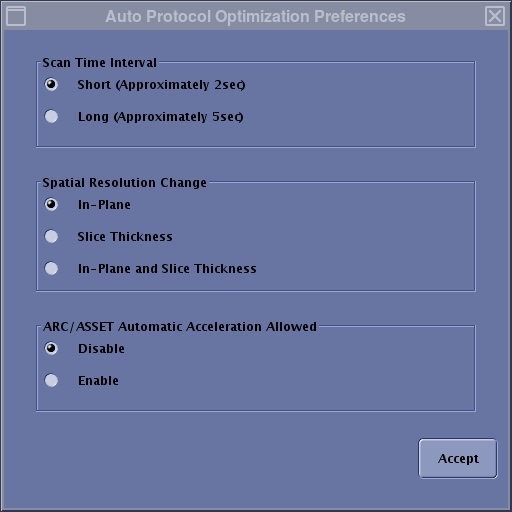
Optional: Select Auto Protocol Optimization Preferences
Step-by-step instructions
From the Auto Protocol Optimization screen, click Preferences.
From the Protocol Optimization Preferences screen, select the best rules to create the protocols.
Click Accept to close the Protocol Optimization Preferences screen.
The selections are kept as a part of the protocol information when the protocol is saved. Figure 1. Example of a Protocol Optimization Preferences screen
Scan time interval: determines the differences in scan time or breath hold time between the optimized buttons.
Spatial Resolution Change: Slice Thickness, Spacing, and number of slices from the original protocol are kept on each button when In-Plane is selected. Frequency and Phase are kept when Slice Thickness is selected. All of those parameters can be modified when In-Plane and Slice Thickness is selected.
ARC/ASSET Automatic Acceleration Allowed: When Disable is selected, the algorithm does not control anything for parallel imaging. When Enable is selected, the algorithm controls the Acceleration factors of parallel imaging, even if the parallel imaging option is off in the original protocol. The system controls parallel imaging in the following scenarios:
The algorithm decreases the Acceleration factor thus keeping SNR with a higher resolution.
The algorithm increases the Acceleration factor only if needed, that is to say, the scan time or breath hold time has not been shortened enough by reducing spatial resolution based on the selection of Spatial Resolution Change.