• Object ID: 00000018WIA307F2870GYZ
  • Topic ID: id_40023645 Version: 1.2
  • Date: Feb 11, 2022 11:37:19 AM

Open Guided Install

About this task

Use these steps to open a Guided Install application. The list of applications may change based on your system configuration.

Step-by-step instructions

  1. In the header area, click the Tools icon to open the System Management work area.
  2. Click the Service Desktop Manager tab to view the Service Desktop Manager screen.
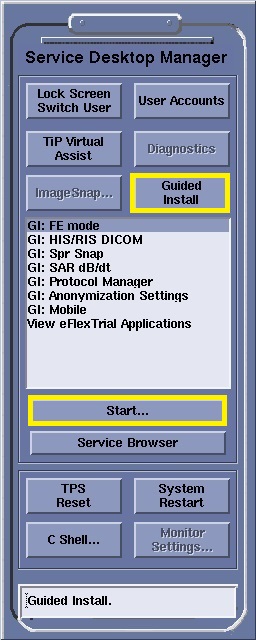
  3. Click Guided Install to view the list of applications.
  4. Select the desired application.
  5. Click Start.
    Figure 1. Example of Service Desktop Manager screen