From the Workflow Manager, select a Real Time series with i/Drive Pro Plus and click Setup.
Make any changes as needed, and then click Save Rx > Scan to initiate the Real Time acquisition.
Select the coronal Home image.
Click Define Scout.
Click Save Image when the diaphragm is in the most superior location (expiration).
Click Draw Line to turn the line tool off.
Select the coronal Home image.
Click Step and position the cursor so that the arrow is pointing either towards or away from you.
Click until you see a good heart image.
Click Save Image to capture several coronal images for positioning the 3D volume.
Click Close to exit the real time screen.
Acquire 2D FIESTA CINE images.
From the Workflow Manager, select a 2D FIESTA CINE AST series.
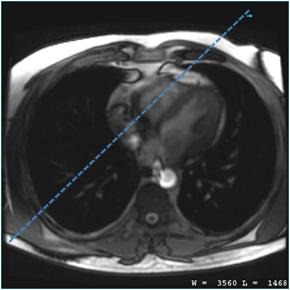
On the axial or oblique-axial localizer images, prescribe a vertical long axis view of right chambers with a shim volume that covers the heart.
Figure 1. Long axis prescription
Scan with breath hold instructions.
From the Workflow Manager area, click Add Task > Add Sequence.
Select a protocol from your Site or GE library that has a 3D FGRE or 3D FIESTA with Navigator and Cardiac Gating as selected imaging options.
Adjust scan parameter, as needed.
Complete selections from the Cardiac tab.
ECG gated images quality is degraded when the heart rate is greater than 75 BPM.
Regarding coronary artery imaging, it is extremely critical that on the Cardiac tab, you enter the correct Trigger Delay for the middle diastolic phase and that you have a good target scan for localizing the optimum trigger delay.
Accurate trigger delay and acquisition window selection are the most important factors affecting vessel visualization. In general, follow these guidelines.
Table 1. Gating guidelines
Heart Rate
Trigger delay
0.5 NEX: # RR & ASSET
1 NEX: # RR & ASSET
< 75 BPM
patient diastolic value
3
4
> 75 BPM
patient systolic value
3 RR and ASSET
4 RR and ASSET
Arrhythmic
patient systolic value
3 RR and ASSET
4 RR and ASSET
# of RR Interval: Choose 3-4 RR intervals for heart rate (HR) of <75BPM (this gives an acquisition window/RR interval of » 200 ms), 3-4RR intervals + ASSET if HR is >75BPM (acquisition window » 144 ms). Only even numbers of RR intervals are allowed if 1NEX is selected. Increasing # of RR Intervals decreases the acquisition window and therefore reduces the cardiac motion at the expense of longer scan time.
Trigger Window: Use 10% if HR is stable.
Trigger delay: Select a patient specific trigger delay to capture the quiet systolic or diastolic phase based on table above. Trigger delay can be observed from 2 or 4 ch view in 2D FIESTA CINE.
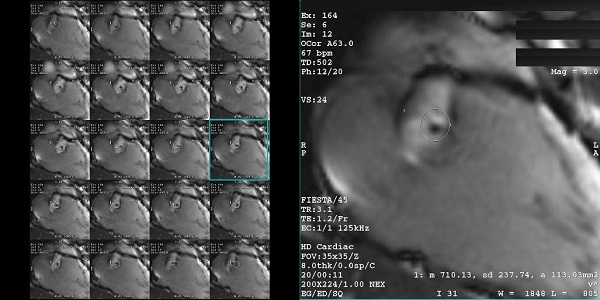
Review the images and determine the quiet phase (in this example image 12) by observing the motion of the coronaries. The quiet phase is the first trigger delay time in systole or diastole where the coronaries is relatively static. Use this view to determine the best trigger delay.
Figure 2. Image 12 represents the quiet phase to be used for the best trigger delay
ASSET shortens the scan time reducing the # of RR Interval in Cardiac tab. Phase FOV should be set to 1 whenever ASSET is turned ON. Use the default acceleration factor (2.00 Phase). If ASSET artifact is observed, lower the accelerator factor to 1.75 Phase. It is available with multi-slab:
If any or all of these scan parameters are selected (ASSET, HyperBand, PURE), and if you select On from the Calibration in Prescan menu, which is located on the Details tab, a calibration scan is acquired during Auto Prescan.
1 NEX can only be used with even number of RR intervals. If an odd number of RR interval is selected, you must use 0.5 NEX.
Click the Advanced tab and select User CV values, if needed.
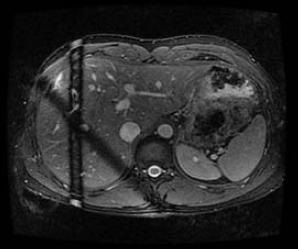
Turbo Mode (3T FGRE only): When On, it activates a shorter RF pulse. Figure 3. Suppression bands
Slice Partial Fourier (70%-100%): Reducing slice resolution to 80% can reduce scan time with slight blurring in slice direction. Only available with 1 NEX. Note that you must change #RR to an even number before switching to 1 NEX.
Graphically prescribe the whole heart or targeted slabs.
Apply Navigator tracker and acquire the scan.
Image quality of the Navigator scans is dependent on the patient's breathing pattern and the tracker placement. Navigator guided scan image quality is degraded if the patient's breathing pattern and therefore respiratory waveform is irregular.