

- 00000018WIA30E28870GYZ
- id_400265891.2
- Feb 8, 2022 4:57:15 PM
Scan Stop Watch
The Stop Watch is typically used to monitor timed scans such as CEMRA acquisitions. The Stop Watch window floats on top of all desktops so that you can see it at all times until it is closed.
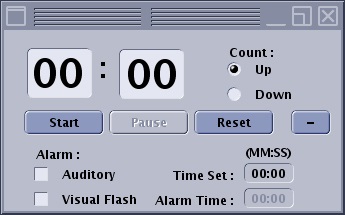
| Parameter | Description |
|---|---|
| Time field | Text field in which you enter minutes and seconds. |
| Count Up/Down | Option buttons to select the count direction. |
| Reset | Resets the counter to 00:00. |
| Start | Start begins the count up or down of the time that is entered in the minute and seconds text fields. If no time is set, it counts up in a free running mode. |
| Pause | Pause temporarily stops the clock until you click Start again. |
| Reset | Reset changes the clock setting to zero if you are counting up and the programmed time if you are counting down. For details, see Reset. |
| Alarm selections | The alarm options produce an effect for the time set in the Alarm Time text field.
|
| Maximize and Minimize Selections | [-] minimizes the stop watch display so that only the stop watch minute and second time field, Count Up/Down option buttons, the Start, Pause and Reset buttons. [+] maximize button are displayed. |
| Close
| Click the Close icon to close the window. The counter continues to count up/down when the stop watch is closed. |
