

- 00000018WIA30FBE770GYZ
- id_400221611.16
- Sep 5, 2022 2:16:48 AM
Gating Control screen
In the header area, click the Tools icon ( ) to open the System Management work area. Click the Gating/Fan/Light tab to open the Gating Control screen. Alternatively, in the footer area, click the Hardware icon (
  ). Click the Gating tab to open the Gating Control screen.
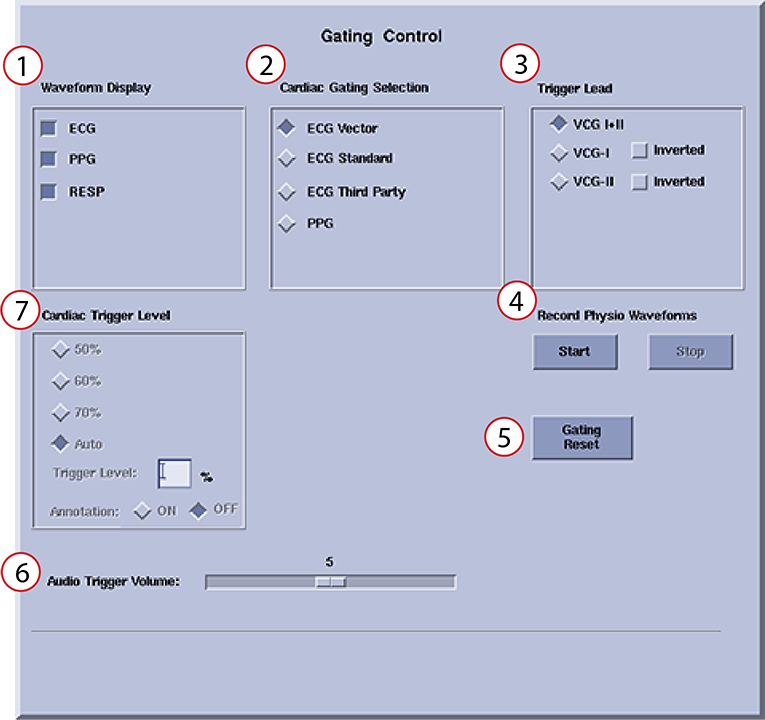
| Number | Item | Description |
|---|---|---|
| 1 | Waveform Display | These items control which waveforms appear in the console and on the in-room display. Choose to display any or all of the waveforms.
|
| 2 | Cardiac Gating Selection | These items control the cardiac trigger. Choose one item.
|
| 3 | Trigger Lead | These items control the gating algorithms on the respective channels. The item that you select in Cardiac Gating Selection determines the available Trigger Lead items.
|
| 4 | Record Physio Waveforms | Select Start and Stop to record ECG, PG, and respiratory signals. |
| 5 | Gating Reset |
Select Gating Reset to clear the triggering history and relearn the patient’s waveforms. Do this before scanning when the patient is at the scan position and the waveforms are free of interferences. You can also select Gating Reset if:
Note: This function does not correct problems caused by inadequate lead connections.
|
| 6 | Audio Trigger Volume (cardiac triggers only) | Use the slider to adjust the audio signal that indicates trigger detection. 0 is off, and 10 is the maximum volume. |
| 7 | Cardiac Trigger Level | These items are active if you select certain cardiac triggering method in Cardiac Gating Selection.
Select to enable a threshold tick mark on the Waveform tab. The tick mark indicates the amplitude of the trigger level for any waveform where the threshold level is allowed to be adjusted (PPG and some ECG waveforms). |
| Not pictured | Fan and light controls | Use the arrows to adjust the fan speed or light intensity. |