

- 00000018WIA306DE770GYZ
- id_400270031.4
- Apr 28, 2022 6:29:31 PM
Cardiac tab
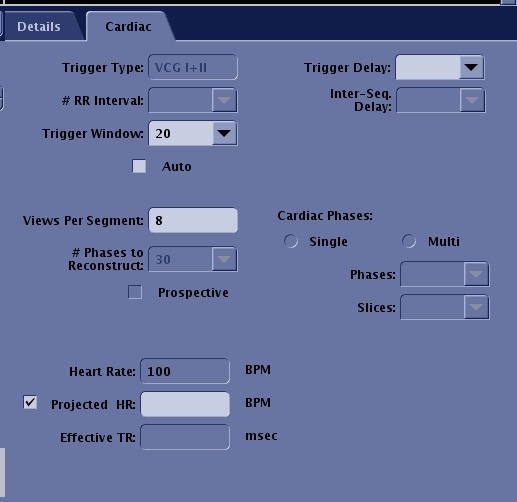
From the Scan Parameters screen menu bar, click the  and then click the Cardiac tab. The Cardiac tab only appears if Cardiac Gating/Triggering Imaging Option is selected.
| Parameter | Description |
|---|---|
| Trigger Type | The Trigger Type field displays the gating sensor selected from the Waveform and Gating Selection area of the Gating Control screen. This field cannot be edited or stored in a protocol. Make your gating selection from the Gating Control screen during patient setup. That selection remains active until it is changed. |
| # of RR Interval | Select the # of RR Interval to define the effective TR for the sequence (Spin Echo, FSE, and MPGR). FSE-IR with Blood Suppression must be 2 x RR. |
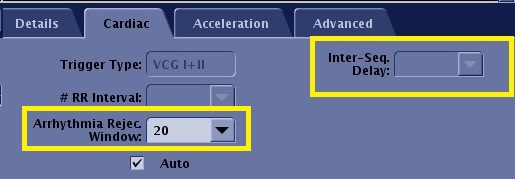
| Trigger Window or Arrhythmia Rejection Window | Choose a Trigger Window or Arrhythmia Rej. Window. The name of this field changes with the PSD selected.
Note: If the Trigger Window is too small, a slight increase in patient heartbeat can trigger arrythmia rejection and stop the scan. This can happen if the patient holds their breath. |
| Trigger Delay | Type in a Trigger Delay time or select the minimum, systole, diastole, or recommended delay time, which is from the time the R-wave is sensed to the delivery of RF. |
| Inter-Seq. Delay | Click Single or Multi to define whether single-phase or multi-phase images will be acquired when the sequence is cardiac gated with Spin Echo or FSE. In a multi-phase sequence, define the phases and slices.
|
| # of Card. Phases to Reconstruct | Enter the number of cardiac phases to obtain in FastCINE sequences. Click Prospective to perform a Fast Card sequence. The maximum number of phases is affected by the Views per Segment. |
| Views per Segment | In the Views per Segment text box, type in the number of k-space lines to acquire per cardiac phase during one RR interval in Fast Card and FastCINE sequences. As the VPS increases, the temporal resolution and scan time decrease. |
| Heart Rate | The Heart Rate field displays the patient's heart rate. The heart rate is automatically updated at 5 second intervals only if the Cardiac tab is open. This is not an editable field. |
| Projected HR | Select Projected HR option box and type-in a value, if necessary for the exam, e.g., stress exams or when you want to scan with a specific heart rate due to a significantly fluctuating heart rate. |
| Inhance Deltaflow:
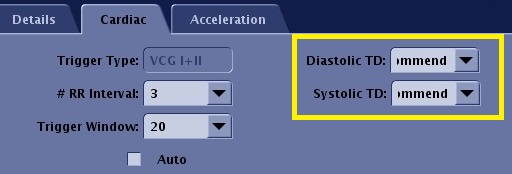
Diastolic TD | Select the Trigger Delay from the multi-phase SSFSE scan that displays conspicuous arterial signal, the sharpest vessels, and 1-2 phases before any blurring/ghosting occurs. |
| Inhance Deltaflow:
Systolic TD | Typically select Recommended. |