

- 00000018WIA30D28F80GYZ
- id_20381811.1
- Apr 12, 2022 12:04:14 PM
Remote software and user manual download
Do these tasks to download, install, or reject software updates. You can also download and install the user manual.
Prerequesites:
- You must be signed into the system as a member of the GESoftwareInstaller group. For more information, see Data Privacy.
- The system must be online.
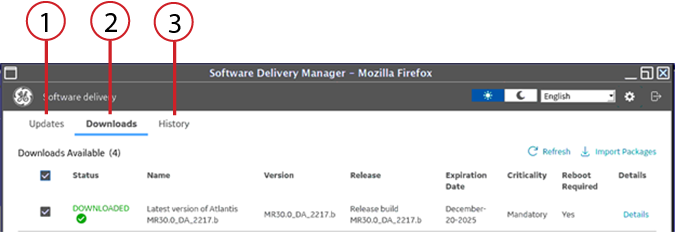
| Item | Description |
|---|---|
| 1 | Updates This tab lists all of the available updates to download. When you select this tab, the system searches for the available updates. Software is available either on demand or by manually triggering the download. |
| 2 | Downloads This tab lists all of the software or user manuals that are available to install. Scheduled downloads are also here. |
| 3 | History
This tab lists the statuses of all of the downloaded software or user manuals. Both installation failures and successes are on the History tab. |
Standard versus Service Desktop
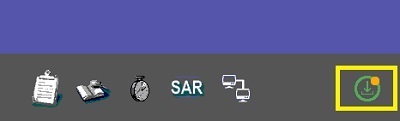
Most users click the green icon in the right corner of the screen to access the Software Delivery Manager. If you restart the system, the system automatically launches the Software Delivery Manager.
Service users access the Software Delivery Manager from the Service Desktop. Select Utilities, then Remote SW Download.