

- 00000018WIA30DBC770GYZ
- id_400267141.15
- Aug 14, 2022 5:11:18 PM
Scan work area
Click Start Exam on the Work List Manager to view the scan work area.
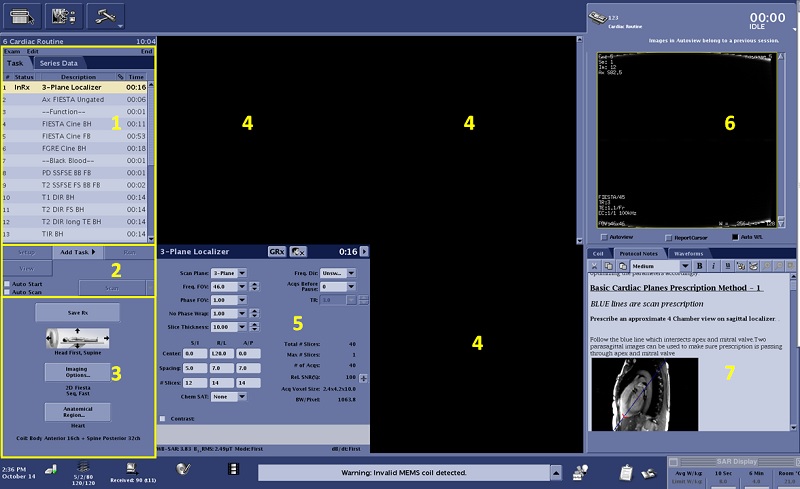
| Number | Description |
|---|---|
| 1 | WorkFlow Manager
The workflow manager is used to prescribe scans. For details, see Workflow manager and task list. |
| 2 | Scan/Task panel
The Scan/Task Control panel is used to control scan and Workflow Manager tasks. For details, see Scan/Task controls panel. |
| 3 | Series Summary panel
The Series Summary panel content changes when each series in the Workflow Manager is placed in the Setup state. For details, see Series Summary panel. |
| 4 | Graphic Rx area
The localizer viewports display the images from which you graphically prescribe a series. Images from the localizer series are the default images displayed. Images from other series can be displayed in these three viewports. For details, see Graphic Rx. |
| 5 | Scan Parameters area
The system default is to have the lower right quadrant viewport display an image. This viewport is overlaid with more scan parameters when you click the arrow on the Scan Parameter menu bar. You can change the system default so that the normal behavior is to display more scan parameters rather than the third localizer image. For details, see Scan Rx parameters. |
| 6 | AutoViewer area
AutoView displays images in the order they are reconstructed. For details, see Scan AutoView. |
| 7 | Tabs: Waveform display, Protocol Notes area, Coil
For Protocol Notes details, see Protocol Notes. For Waveform details, see Waveforms tab. For Coil details, see AIR TouchTM Coil tab. |