

- 00000018WIA30063970GYZ
- id_400243601.3
- Mar 28, 2022 3:01:29 PM
Diffusion Tensor Imaging workflow
About this task
Important: Diffusion Tensor images attempt to characterize behavior of water molecules in imaged tissue. Therefore, fiber tracking representation actually displays algorithmically predicted water molecule direction. These displays may be only representative of the actual white matter anatomy. A trained neuro radiologist is required to make the association between the rendered tract display and the actual patient’s anatomy.
Step-by-step instructions
- Select the desired scan plane and map from the scan plane and map yellow annotation menus.
Figure 1. Scan plane and functional map active annotation 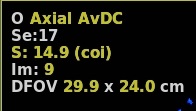
- When DTI launches, the default protocol has a particular scan plane and a map(s) displayed in the three map viewports. You may prefer to have a different scan plane and map in each viewport.
- Right-click the map text in a map viewport to display a different map.