MAGiC DWI (Synthetic DWI) may not be for sale in all markets due to approval or clearance by in-country regulatory agencies. Synthetic DWI is commercially known as MAGiC DWI.
About this task
Considerations:
The available range of synthetic b-value is based on b-value entered in the b-value and NEX list and an upper and lower limit. The absolute minimum b-value is 100 and the absolute maximum b-value = 2500.
lower limit: minimum scanned b-value - scanned b-value range x 2.5
upper limit: maximum scanned b-value + scanned b-value range x 2.5
For example, if you prescribed b={700,800}, then the available range is:
lower limit = 700 - (800-700) x 2.5 = 450
upper limit = 800 + (800-700) x 2.5 = 1050
For abdominal and pelvic scans, prescription of 2 or more b-values, instead of prescription of 1 b-value with T2 image, improve synthetic DWI image quality due to bright blood effect on the T2 image.
If the entered synthetic b-value is invalid, an information message displays a valid synthetic b-value range based on prescribed acquisition b-values.
Use these steps to synthesize b-value diffusion weighted images using scanned DWI data. MAGiC DWI uses acquired DWI images to synthesize new DWI images with user selected b-values. The acquired DWI images must have, at a minimum, 2 values, one of the b-values may be a T2 image.
Warning
Before you acquire a MAGiC DWI scan review the following:
MAGiC DWI images may show different contrast from images acquired directly with DWI due to different TE, Intra-Voxel Incoherent Motion effect (in liver), and in the brain, restricted diffusion effect.
MAGiC DWI may show artifacts or incorrect image calculations in moving organs.
MAGiC DWI may show artifacts due to diffusion distortion. Thus, to minimize the artifact, it is recommended to select Real Time Field Adjustment scan parameter from the Details tab .
MAGiC DWI should not be used in ADC calculation in READY View, FuncTool, or any other 3rd party tools.
Diagnosis should not be made by only reviewing the synthesized images.
Step-by-step instructions
While a scan is in session, select a DWI series from the Workflow Manager and click Setup to review the parameters.
Click the Diffusion tab and make the selections.
Diffusion Direction: select an option from the menu other than Tensor, which is incompatible with Synthetic DWI.
# of T2 Images: enter a value in the text field.
If 0 is entered, then at least two b-values must be prescribed to use synthetic b-value.
If 1 is entered, then at least one more b-value must be prescribed to use synthetic b-value.
NEX for T2: enter a NEX value that is applied to each of the T2 images.
# of b-values: in the text field, enter a value. The minimum allowed is either:
2 if the value in the # of T2 images text field = 0.
1 if the value in the # of T2 images text field = 1.
b-value and NEX list: type and enter the desired b-value and NEX for each number.
Typically, as the b-value increases, increase the NEX value.
Increasing NEX has an added benefit of reducing artifacts caused by motion, especially for navigated or respiratory triggered acquisitions.
# Synthetic b-values: enter a value in the text box, typically at least 1.
Synthetic b-value list: type and enter the desired b-value for each number. The Synthetic b-value list does not display under the following conditions.
When the # of Synthetic b-values = 0.
When the # of T2 images = 0 and the # of b-value = 1.
When there is 1 b-value less than 2500, for example b= (0,1000), b= (100,2000).
Click Save Rx > Scan.
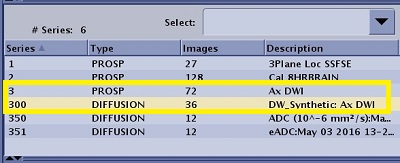
The source and synthetic DWI images, and ADC and eADC maps prescribed as post-process tasks are displayed in the Patient List.
The MAGiC DWI series number is the original series # x 100. Figure 1. Patient List with DWI source prospective series selected