

- 00000018WIA30CC3870GYZ
- id_400244471.8
- Mar 19, 2022 11:32:54 AM
In-room display patient setup screen
The Patient Information screen displays patient information and allows selection of Patient Weight, Auto Start and Patient Position orientation. The green landmark line changes from dashed to sold when the landmark is established.
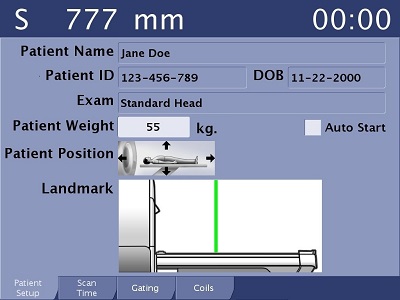

The far left text indicates the patient table location relative to the landmark (S = superior, I = inferior). If the landmark has not been established, this field is not displayed.
The scan time counts down once scan begins. The field is not displayed until a landmark has been established and there is no error on the coil tab.
| Field | Description |
|---|---|
| Date of Birth | Date of Birth is useful as a table-side secondary patient identification field. |
| Patient Weight | Select the Patient Weight text field to display the keypad. Select the appropriate numbers to enter a weight and select OK .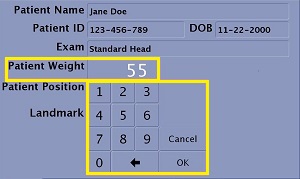 |