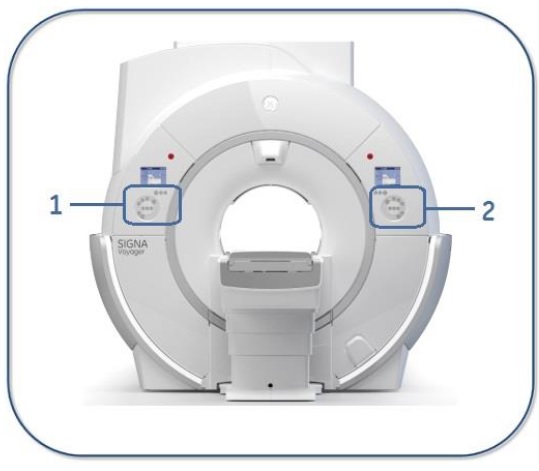
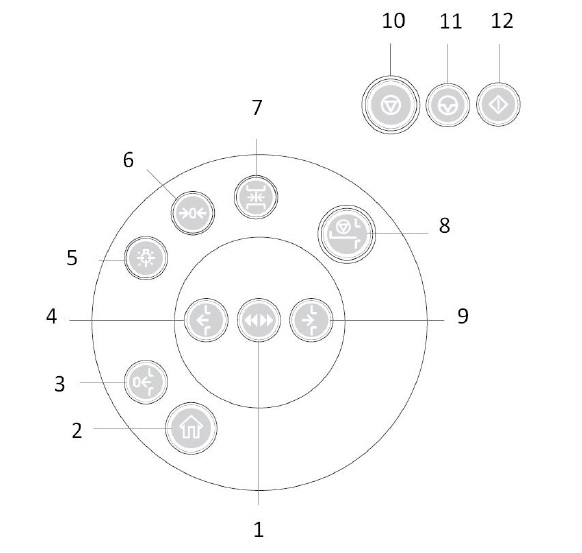
| 1 |  | In/Out Fast moves the table in/out of the magnet bore at a faster rate when pressed simultaneously with the In or Out button. |
| 2 |  | Home returns the cradle to the home position, fully retracted on the patient transport. |
| 3 |  | Back to Landmark returns the table back to last landmarked position. |
| 4 |  | Out retracts the cradle from the bore. To retract the cradle quickly, press In/Out Fast button and simultaneously press the Out button. |
| 5 |  | Alignment turns alignment lights on or off. When the alignment lights are on, this button is lit and the “landmark on” message is posted on the status panel. |
| 6 |  | Landmark enters the defined landmark. |
| 7 |  | Advance to Scan advances the defined landmark to magnet isocenter. |
| 8 |  | Stop Table halts in-and-out cradle movement. This button overrides all other cradle motion commands. |
| 9 |  | In advances the cradle into the bore. To advance the cradle quickly, press In/Out Fast button and simultaneously press the In button. |
| 10 |  | Stop scan stops a scan during either prescan, an active scan, or after Pause Scan is pressed. |
| 11 |  | Pause Scan temporarily halts scanning. |
| 12 |  | Start Scan restarts a study if Pause Scan is pressed, or cradle motion exceeds 2 mm. |