- 00000018WIA300D3870GYZ
- id_400254391.9
- Jun 27, 2022 4:05:50 AM
In-room display gating screen
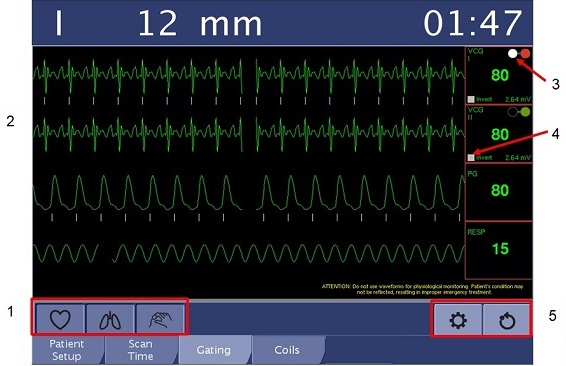
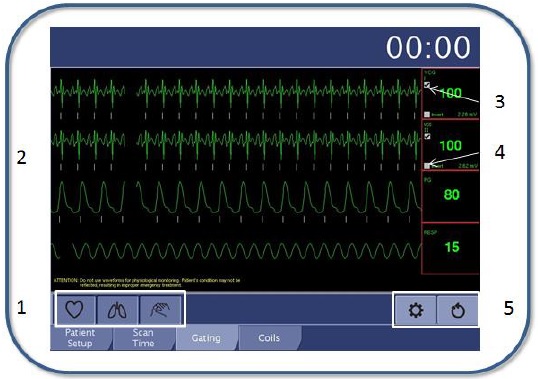
| Number | Description |
|---|---|
| 1 | ECG icon  : select to toggle the display between all four waveforms and the cardiac-only waveform. : select to toggle the display between all four waveforms and the cardiac-only waveform. Respiratory gated icon Peripheral gated icon |
| 2 | Waveform display: ECG gating, peripheral gating, and respiratory. |
| 3 | Click to select gating lead: VCGI, VCG-II, VCG I + II, PG, and RESP. |
| 4 | Click to invert the waveform. |
| 5 | Settings icon  : select to toggle the Settings control panel on/off. : select to toggle the Settings control panel on/off. Reset icon |
 : select to toggle the display between all four waveforms and the respiratory-only waveform.
 : select to toggle the display between all four waveforms and the peripheral gated only waveform.
 : select to reset the gating system.
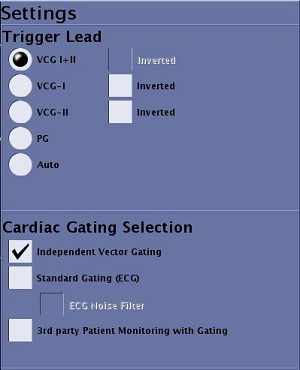
Settings control panel
The options on the Settings control panel can also be accessed from the Gating Control screen. The Settings control panel allows you to do the following:
- Select the best trigger lead.
- Invert the ECG waveform
- Select the cardiac gating lead type: VCG, Standard or third party.
- Apply a noise filter for Standard gating leads.