

- 00000018WIA30023970GYZ
- id_400234121.4
- Aug 19, 2022 2:28:38 PM
FLAIR EPI
FLAIR EPI is designed to minimize the signal from CSF on a T2-weighted EPI sequence.
FLAIR uses a long TR (~ 10,000 msec), long TI (~ 2300 msec) and a long TE (100 to 200 msec). It differs from the Fast FLAIR technique in that it uses an EPI data acquisition method which introduces more magnetic susceptibility effects into the image.
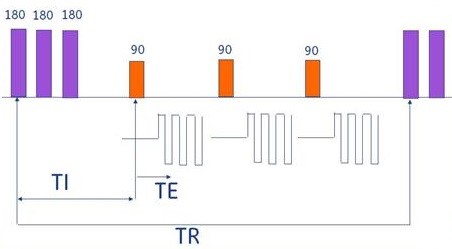
Use the FLAIR EPI sequence for brain imaging to minimize signal from CSF.
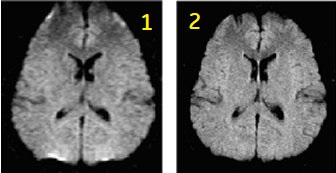
| Number | Description |
|---|---|
| 1 | Single-shot |
| 2 | Multi-shot |
Consider this information when modifying FLAIR EPI scan parameters. For specific scan parameter values, select a protocol from your GE or Site library.
- Scan selections: 2D Mode, Echo Planar Imaging family, FLAIR EPI pulse.
General considerations
- When using the head coil, axial, axial oblique, coronal, and coronal oblique planes automatically have the phase and frequency swapped, in comparison to non-EPI scans. This is to lessen the presentation of geometric distortion and to reduce the potential for peripheral nerve stimulation.
Scan parameters
- Bandwidth: As the RBw increases, the ESP decreases (which is desirable), which means the Minimum TE decreases, and the SNR decreases. Select an RBw that is a compromise between SNR and short ESP requirements.
- The shortest possible ESP is desirable for a single-shot acquisition.
- FOV: Large FOVs produce decreased resolution, increased SNR, and decreased ESP.
- Frequency: As the frequency matrix increases, the ESP increases. For 512 frequency matrix, increase the shots and RBw.
- Phase: As the phase matrix increases, the resolution increases, and the # of slices decreases, but the scan time does not change (scan time = shots × TR).
- Phase FOV: As the phase FOV decreases, geometric distortion decreases.
- Shots: As the number of shots increases, the susceptibility artifacts decrease, and the scan time increases.
User CVs
Click the Advance tab to view the available User CVs. The CVs may vary based on the field strength and selected scan and imaging parameters.
Post-process tasks
For details, see Add post-process task. Compatible post-process tasks include:
- Image Enhancement Filters