

- 00000018WIA3094A870GYZ
- id_400233551.1
- Feb 28, 2022 11:24:56 AM
Spin Echo flip angle
About this task
Select a Flip Angle for the desired image contrast weight and SNR for a Spin Echo pulse sequence.
Step-by-step instructions
- From the Flip Angle menu, select Auto.
- The system automatically sets the Flip Angle from the TR value to provide optimal T1 image contrast.
The following graph illustrates different flip angles correlated to different TR values.
Note: that the optimum contrast with a varied flip angle is the same curve. Curves 4 and 6 illustrate that the lower the TR the higher the flip angle.Figure 1. Flip angle and TR 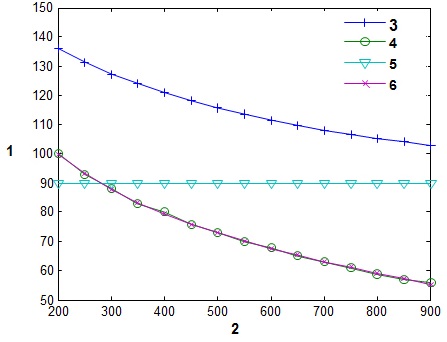
Table 1. Table legend Number Description 1 Flip angle in degrees. 2 TR (repetition time) in ms. 3 Ernst angle to achieve highest signal for white matter. 4 Flip angle for t1memp PSD. 5 Spin Echo flip angle. 6 The optimum flip angle to achieve the best signal difference between gray and white matter.