About this task
Use these steps to save the object with a reference to the original data set and then you can reload it in the same state.Step-by-step instructions
- Open the MR General Review.
- From the Export Toolbar, click the State icon (
 ) to view the Save State screen.
Figure 1. Save State screen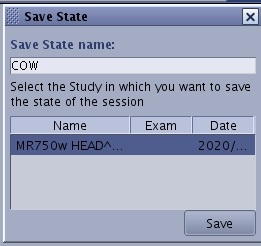
- From the Save State screen, enter a name in the Save State name text field.
- Select the study from the list in which you want to save the state of the session.
- Click Save.
- The model is saved as a new series in the patient list with a type of SSAVE. It will save:
- Segmented volumes
- Multi exams dataset
- View layout
- Current 3D cursor position
- 3D cursor synchronization between different volumes
- State of review controller switches (synchronize, MP, iconified)
- User–defined ROIs/VOIs (location, size and statistics)
- User Measurements
- User Annotations
- To Recall a saved state image, follow these steps.
- From the patient list in the Image Management work area, click the SSAVE series.
- Open the MR General Review.
- The series is loaded into the Save State Layout preset.

