About this task
Use these steps to save all the images/maps generated in a functional protocol.Step-by-step instructions
- Open the MR General Review.
- From the Export Toolbar, click the Save icon (
 ).
).
Figure 1. Save Functional Volume screen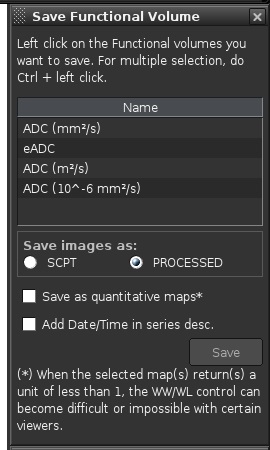
- From the Save Functional Volume screen, complete the following:
- Press Ctrl + left-click the functional volumes you want to save.
- Select the image type: SCPT or Processed.
- Click Save as quantitative maps as needed.
- Click Save.
- Maps are saved based on the images type set from the Save Functional Volume screen.
- For details, see Export.
- The series are time stamped for the date they were saved.

