• Object ID: 00000018WIA3045A970GYZ
  • Topic ID: id_40023445 Version: 1.2
  • Date: Mar 9, 2022 1:07:46 PM

Integrated Registration preferences

To view the Integrated Registration Preferences screen, from the MR General Review work area, click the Preferences icon in the upper right corner. From the Preferences menu, click Integrated Registration.
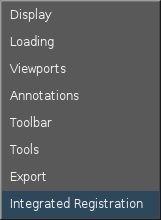
Figure 1. Preferences menu


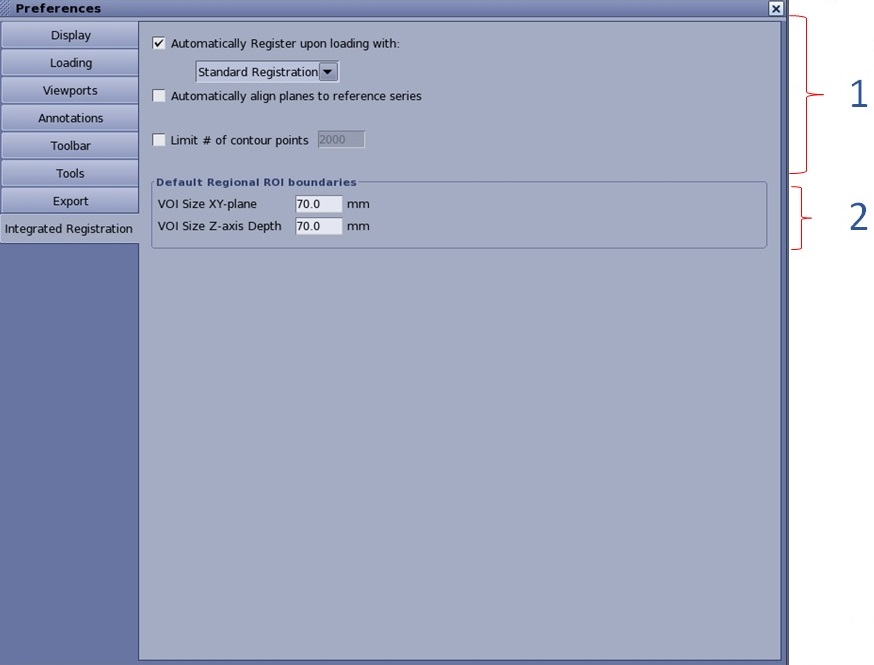
Figure 2. Integrated Registration Preferences screen


Table 1. Image legend
NumberDescription/Procedure
1Loading considerations

Enable or disable automatic registration upon loading

  • If you select the Automatically Register upon loading with option button, you can choose between Standard Registration and Fast Registration.
  • By default, the option button is selected, and Standard Registration is used for automatic registration.

Automatically align planes to the reference series

  • If automatic registration upon loading is applied, you have the option to automatically align planes to the reference series by selecting the option button.
  • If automatic registration at loading is not applied, this option button is disabled.
  • Automatic registration is also available in Integrated Registration compatible protocols when you use Volume Viewer’s Dynamic Load function. In such cases, registration will take place if no other series with similar FoR (Frame of Reference) is registered already, or it is uncertain which group to use for propagation.

Limit # of contour points

  • This option allows you to apply a limitation on the number of contour points for contours saved with the RTSS and used in Treatment Planning Systems (TPSs).
  • The value range is 3 to 10000.
  • By default, this option is not selected and the value is set to 2000.
2Default Regional ROI boundaries

The default values are 70 mm for VOI size XY-plane, and 70 mm for VOI size Z-axis depth. When Fast ROI is utilized and the user draws a ROI in one of the reformat planes, the length (mm) of the 3rd dimension is used from this preference. Also, when you select Regional Registration (i.e., around the cursor), from the on-view menu option, the size of the box (which is not seen) is determined by this user preference.