• Object ID: 00000018WIA3013F770GYZ
  • Topic ID: id_40027039 Version: 1.2
  • Date: Mar 9, 2022 12:51:35 PM

Annotations preferences: adjust annotation fields and fonts

To view the Annotation Preferences screen, from the MR General Review work area, click the Preferences icon in the upper right corner. From the Preferences menu, click Annotations.
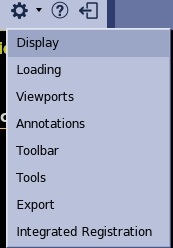
Figure 1. Preferences menu


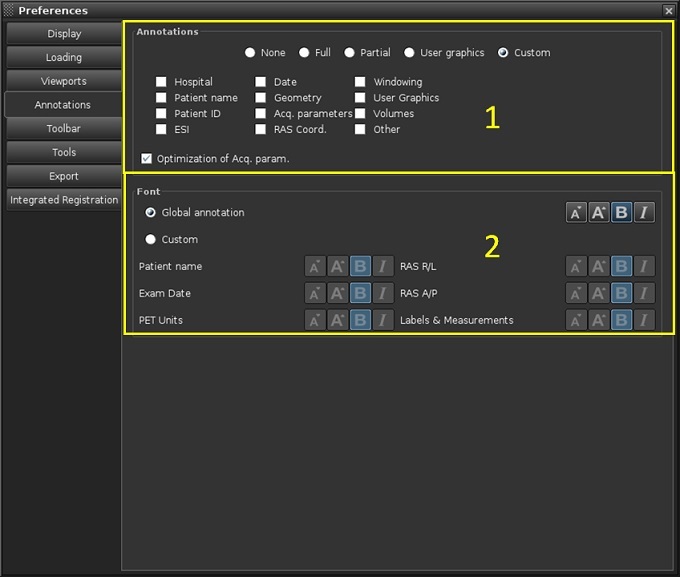
Figure 2. Annotations Preferences screen


Table 1. Image legend
NumberDescription/Procedure
1Annotations areas
  • Click one of the following to define the image annotation: None, Full, Partial, User graphics (measurements and annotations only), or Custom.
  • If Custom is selected, then click each option box to include that image annotation category.
  • Click Optimization of Acq Parameter only if Full or Custom are selected.
    • If it is selected, then the acquisition parameter details are displayed on 1 viewport.

    • If it is not selected, the acquisition parameter details are displayed on all viewports.

2Font area

Click one of the following to determine the font size and emphases (italics or bold face) for the image annotation:

  • Global Annotation for all image annotation.
  • Custom and then select the desired size and emphasis for each listed image annotation group.

These preferences only apply for display and not to the Filmer.