

- 00000018WIA304D0F80GYZ
- id_400231501.4
- Jul 26, 2022 12:00:00 PM
Startup from an extended shutdown
About this task
Use these steps if you have performed an Extended shutdownprocedure.
Important: The equipment room is typically used by service engineers to service the equipment. Use caution when inside the equipment room.
Important: Do NOT open any GE MRI System Cabinets or protective covers. There are dangerous high voltages within the cabinets. There are several Cabinets and components within the equipment room used by the GE MRI System.
The Main Disconnect Panel (MDP) is the incoming Power for the MRI System and Cryogen Cooler. Do NOT turn off power to this component. The Cryogen Cooler cabinet must remain on to keep the helium at the proper temperature to maintain correct magnet pressure.
- The ISC cabinet contains the system PDU and Gradient PDU.
- The ICC contains the Cryogen Cooler.
Step-by-step instructions
- From the ISC cabinet, complete the following:
- Open the small access door (1) to view the Main Breaker and EMO button.
- Reset the breaker. Move the breaker from horizontal to On position (fully vertical) (2).
- Press the EMO Reset button (3). The EMO Reset button turns on power to the high voltage components and results in a blower and relay noise.
Figure 1. Example of: ISC cabinet 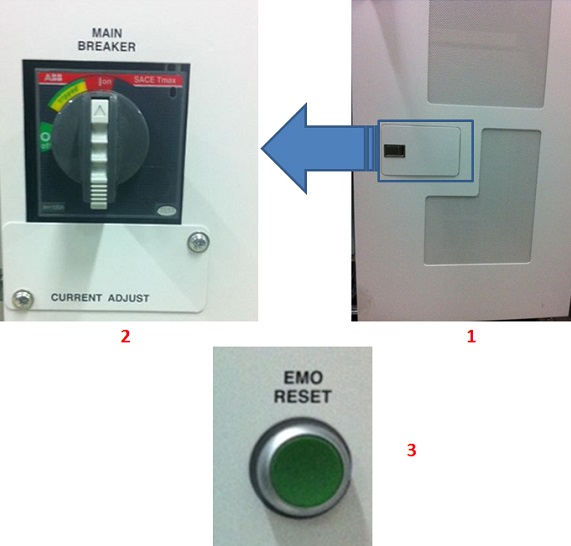
Table 1. Image legend Number Description 1 ISC cabinet 2 Main Breaker in On position, fully vertical. 3 EMO Reset button.
- If the computer does not automatically turn on, then see Start up and shut down the system.