There are times during a system startup or reboot, that the MR system executes a thorough file integrity check (correcting corrupted files, bad blocks, capturing file system information for better analysis of issues, etc.). The startup or reboot can take as long as 40 minutes. The following criteria determines the check:
If the system is not shut down in an orderly fashion, for example a power outage shuts down the computer.
Use these steps to restart your MR system.
Step-by-step instructions
Make sure all of the images have reconstructed and are available for display from the Patient List.
Click End Exam, if necessary.
Wait for all Archive and Network functions to complete.
Remove any archive media, if necessary.
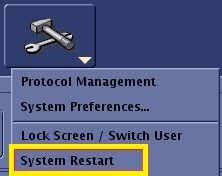
From the header area of the screen, click the and select System Restart.
It may take up to 30 seconds for the system to respond. Figure 1. Tools menu
When prompted, click the reason for the system restart: Daily, Service, Other, or Cancel to exit the restart of your system.
The system displays a blue screen with the icon/status area at the beginning of shutting down.
Wait for the Welcome to... logon window to appear. This indicates restart completion.


 and select System Restart.