Use these steps to recover normal system operation after an emergency-stop has occurred. For emergency stop details, see System emergency logon.
Step-by-step instructions
Go into the equipment room and locate the ISC cabinet.
The equipment room is typically only used by service engineers to service the equipment. Use caution when inside the equipment room.
Important
Do NOT open any GE MRI System Cabinets or protective covers. There are dangerous high voltages within the cabinets.
From the ISC cabinet, which contains the system PDU and Gradient PDU, complete the following.
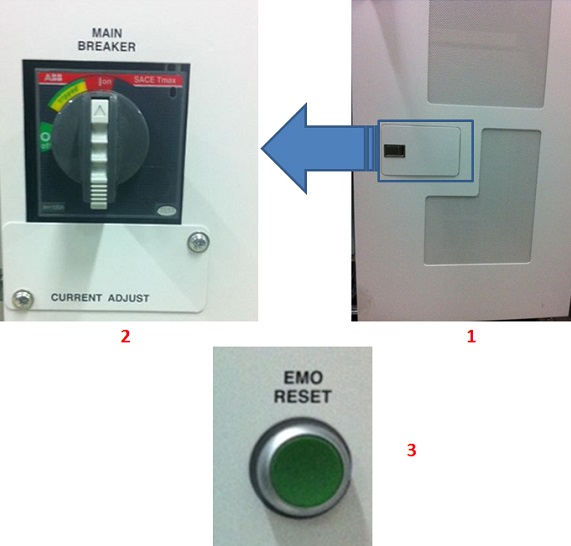
Open the small access door to view the Main Breaker and EMO button.
Press the green EMO Reset button.
Figure 1. ISC cabinet
Table 1. Image legend
Number
Description
1
ISC cabinet
2
Main Breaker in On position, fully vertical.
3
EMO Reset button.
Return to the operator console and complete a TPS reset. For details, see TPS reset.
After the TPS reset is finished, the emergency-stop condition should be recovered. If the emergency-stop condition remains after the TPS reset is finished, call your service engineer.