

- 00000018WIA30120870GYZ
- id_400239061.6
- Apr 6, 2022 11:03:12 AM
Remove the magnet cover
Use these steps to remove the magnet cover if you are unable to turn the emergency vacuum break tool in the plug of the vacuum port in a clockwise direction.
- Use a non-magnetic 5 mm Allen wrench to remove the two M6 screws that secure the magnet cover.
Figure 1. Front bridge cover screws 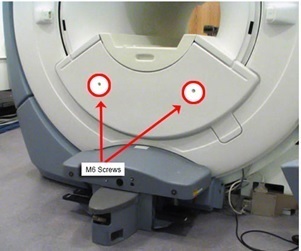
- Remove the front bridge cover.
- If you cannot remove the cover, then undock the patient table and position it away from the magnet and then remove the cover.
- For a fixed table configuration, it is possible to remove the front bridge cover without removing the table. If the table needs to be removed, call a qualified service representative for further assistance.