

- 00000018WIA302BD870GYZ
- id_400231111.5
- May 12, 2022 10:48:58 PM
2D MDE
2D MDE is a cardiac scan in which a single phase for multiple slices is acquired per acquisition.
- Only use recommended 2D MDE protocols from the Chest GE protocol library. A 2D MDE scan is a 2D Mode, Gradient Echo family, Fast GRE pulse, and IR-Prepared and Cardiac Gating Imaging Options.
General considerations
- Acquire a single breath hold scan.
- Use the best TI time provided by the Cine IR scan. For the correct TI selection, please refer to Cine IR procedure. If needed, use a longer TI to improve the image robustness.
- The optimal TI becomes longer as contrast washes out over time. Therefore, increase the TI by approximately 20 ms for every 5 minute delay from the contrast injection. If you are uncertain of the optimum TI, re-acquire the Cine IR scan and make a TI adjustment as needed.
- The RR# should match between the Cine IR and 2D MDE scan.
- Supine and feet first is recommended to ensure accurate cardiac gating/triggering and patient safety by ensuring proper routing of gating cables out of the bore, and proper routing of the coil cable to its attachment point on the coil port carriage.
- For cross-reference purposes, copy the slice prescription (location, thickness, etc) exactly from a FIESTA CINE series.
- If a bounce point artifact appears, it indicates that the TI is too short. Rescan the patient with an increased TI. It is caused by signal cancellation at tissue/blood interfaces. The bounce point artifact looks like a black outline along the endocardial and epicardial borders. Avoid this by choosing a higher TI.
Figure 1. Bounce point artifact 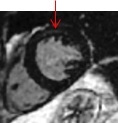
Scan parameters
- Protocol suggestions:
- Flip Angle = 25°
- Imaging Option = ASSET, Acceleration tab R = 1-1.5
- TE = Minimum Full
- 1.5T Bandwidth = 20kHz
- Intensity Correction = PURE
- If the SNR is unacceptably low, modify the scan parameters to create a larger voxels: increase the slice thickness or FOV, or reduce the Bandwidth.
Cardiac tab
- Select a Diastolic trigger delay. For example with a heart rate of 60 BPM, select a trigger delay of 600 ms.
- For a normal heart rate, ensure that the temporal resolution is below 200 ms. Set the #RR = 2, which should result in the temporal resolution less than 200 ms.
- For a heart rate greater than 100 BPM, to keep the temporal resolution below 150 ms, decrease the Views per Segment or the Phase value on the Details tab. Set the #RR = 4.
User CVs
Click the Advance tab to view the available User CVs. The CVs may vary based on the field strength and selected scan and imaging parameters.