

- 00000018WIA301C1870GYZ
- id_400215711.1
- Jan 21, 2022 6:00:17 PM
Ready Brain reference line preference
About this task
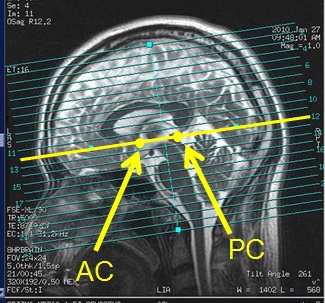
ACPC sets the ACPC line, which extends from the superior surface of the anterior commissure to the center of the posterior commissure.
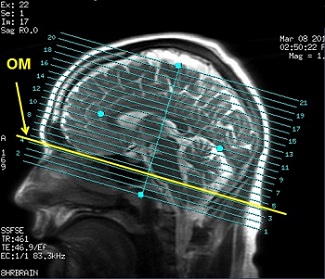
OM set the Orbitomeatal line, which extends from the nasal root through the pontomedullary junction.
The Ready Brain reference line can be set from the Exam Preference screen before saving the first task or the System Preferences screen before starting an exam. To set the Ready Brain reference line from the Exam Preference screen, click the Scan tab menu and select Preferences, and then follow step 3 below.
Step-by-step instructions
- To set the Ready Brain reference line before starting an exam, follow these steps.
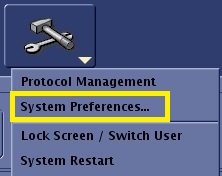
- Click the
 and select System Preferences.
 - From the System Preferences screen, type and enter your password in the Admin Password text field and click Apply.
- Only MR users that have been assigned to the GESystemPreferenceGroup by the site administrator will have a password and thus the privilege to make changes.
- From the Ready Brain Reference Line menu, select either ACPC or OM.
- Click Close.
- Click the
- To set the Ready Brain reference line before saving the first task, follow these steps.
- Click the Scan Session menu and select Preference.
- On the Exam Preferences screen, select Research. Respond to any message prompts.
- From the Ready Brain Reference Line menu, select either ACPC or OM.
- Click Close.