- 00000018WIA308E2870GYZ
- id_400258161.9
- Jul 17, 2022 5:41:47 PM
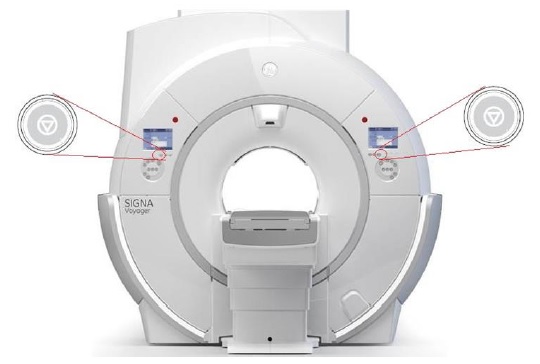
Emergency stop and abort scan
Emergency stop
The Emergency Stop button is located on the keyboard and on both the right and left sides of the magnet enclosure. This function cuts off electrical power from equipment located in the magnet room that may present a hazard to the patient in an emergency situation.
You can press the Emergency Stop button to stop a scan in a patient emergency situation. You should not be afraid to press the Emergency Stop button because it may shut the system down for an extended length of time. This is not required to shut down the magnet coldhead.
To recover from an Emergency Stop situation, see Emergency stop recovery procedure.

The Emergency Stop button disables the following systems:
- RF
- Gradient power supply
- Magnet room unit
- Table and patient support subsystem
| Warning | |
|---|---|
Abort scan
The Abort Scan buttons are located on the magnet control panels. They stop an active scan.